Which AI website builders let you export the code?
Lovable, Bolt, v0, Webflow, Carrd, Hostinger's AI Builder and Ginta let you take your website's code with you; Wix, Framer and Squarespace mostly don't. What you get differs a lot: Lovable, Bolt and v0 give you a whole app project with GitHub sync, Webflow and Carrd give you HTML and CSS on a paid plan, and Ginta gives you a .zip of the website's files on every plan, Free included.
Every competitor fact below comes from the company's own pricing page, docs or help center, checked on 9 November 2026 (links in each section). We make Ginta; where another builder does this better, we say so.
The short table
| Builder | Can you get the code? | On which plans | What you get |
|---|---|---|---|
| Ginta | Yes: .zip + Code tab | Every plan, Free too | The site's HTML, CSS, JS and files as published |
| Lovable | Yes: download + Git sync | Download on paid plans, Git sync on all | A full app project (React) |
| Bolt | Yes: .zip + GitHub | The help page names no plan limit | A full app project |
| v0 | Yes: GitHub sync, ZIP through its API | Not stated on the pages we read | A full app project |
| Webflow | Yes: HTML and CSS | Core Workspace and up | Static pages; CMS content isn't exported |
| Carrd | Yes: .zip | Pro Plus and up | Unminified HTML, CSS and JS; forms don't work |
| Hostinger AI Builder | Yes, in agentic mode | Not stated | A Node.js project (React + Vite) |
| 10Web | Files via backups or SFTP | Not stated | A WordPress site, no one-click .zip of static files |
| Wix | No (Studio Two: React export in beta) | "your site must run on Wix's servers" | |
| Squarespace | Content only (WordPress .xml) | No styles or custom CSS | |
| Framer | Its own help pages disagree | See below |
We left out builders whose own pages we couldn't find an answer on.
Ginta: a .zip of every file, on every plan
Every Ginta website has Download code (.zip) in its Settings → More, on every plan including Free. The zip holds
every current file at the path it's published under, plus a README-GINTA.txt that says in plain words what only works
on Ginta. Before that, the editor's Code view (in the ⋯ menu) shows every file in a tree, with search, and lets
you edit and save by hand: a save is its own version you can undo, and it uses no credits.
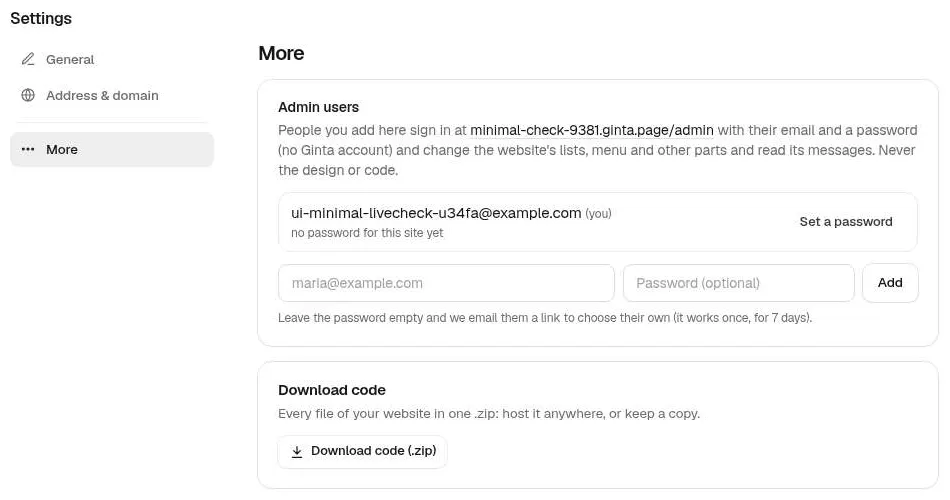
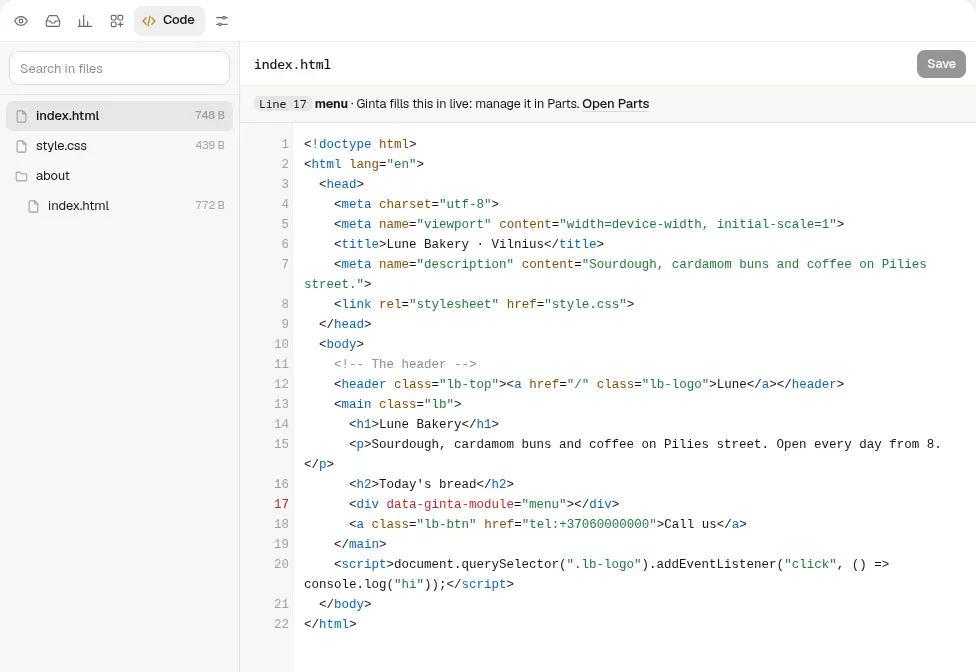
Ginta's own AI writes plain HTML and CSS, so what you download opens in any editor and can be hosted on any static host. If you build with Claude Code, Codex or Cursor and upload a Vite, Astro or Next build instead, the zip gives you that build back. You can also go the other way: change the files elsewhere and upload them again through an upload link or the REST API.
What doesn't come with it (this is Ginta's weak spot):
- Ready-made parts stay empty. The shop, bookings, menu, events, gallery and blog are live services that Ginta
fills in when a page is served. In the files they're one empty
<div data-ginta-module="…">, so on another host a shop page shows no products and nothing can be booked. - Forms stop sending. Contact forms post to Ginta's form address, so elsewhere they need a new form service.
- Photos and fonts from Ginta's addresses (paths starting with
/_g/) still point at Ginta; copy the images you need into the folder. - No GitHub sync and no app project. Lovable, Bolt and v0 keep your code in a Git repository as you go. Ginta doesn't connect to GitHub, and it hosts websites, not apps with their own server code.
Lovable
Lovable's docs: "On paid plans you can download your code directly" (Download codebase in the code editor), and Git sync with GitHub, GitLab and Bitbucket is available on all plans; it "keeps the two in sync automatically", in both directions (Git sync overview, checked on 9 November 2026). Its plan table lists "Download code" and "Edit code" on Pro, not on Free (subscription plans). The code is a real app: older projects use React + Vite, newer ones TanStack Start, with backend functions in the project. Better than Ginta for anyone who wants to keep developing the code in their own tools. More: Ginta vs Lovable.
Bolt
Bolt's help center: "you can download your project as a zip file to work on it outside of Bolt", from a computer, not a phone (Manage your projects). Its GitHub integration commits every working change and "checks GitHub every 30 seconds for any updates made outside Bolt and pulls those in" (GitHub for version control). Neither page mentions a plan limit. Both checked on 9 November 2026.
v0
v0's docs: connecting a GitHub repository makes it "the source of truth for your project's code", and generated changes are committed and pushed to a working branch (v0 and GitHub). Its API can download "the source files for a chat as a ZIP archive" (download chat files). Both checked on 9 November 2026. The docs page on GitHub doesn't describe a ZIP button in the app.
Webflow
Webflow's pricing page lists Code export on the Core Workspace plan ($19 a month billed yearly) and up: "Export clean, semantic HTML and CSS files for your dev team. Dynamic content (CMS items/pages) can’t be exported." (Webflow pricing, checked on 9 November 2026). Good, clean output for a designer who hands a site to developers; blog posts and other CMS pages stay behind.
Carrd
Carrd's docs: on Pro Plus or higher, "the unminified HTML, CSS, and JS source code for any of the sites on your account can be downloaded" as a zip. Carrd is as honest as we try to be about the catch: elements "requiring the Carrd platform to operate (most notably form elements)" won't work in the download, and it "cannot be uploaded back to the Carrd platform" (Downloading a Site, checked on 9 November 2026).
Hostinger's AI Builder
In agentic mode, Hostinger's AI Builder has a Code tab with Export: a .zip of your full project. "The exported code is a Node.js project built with React and Vite", "the only format available for export", and edited code can't be brought back into the builder (How to export code in agentic mode). In the older manual mode, the export moves content to WordPress, and "you can’t export website styles and layout" (export content to WordPress). Both checked on 9 November 2026.
10Web
10Web builds WordPress sites. Its help center says websites from its current Agentic Website Builder have a Code mode where you view and edit the real files in the browser, but "there's no single button that packages them into a downloadable .zip of static files"; for a copy of the files you download a full backup or use SFTP (Can I have HTML and CSS code of my website, updated 28 October 2026, checked on 9 November 2026). Better than Ginta if you want WordPress with plugins and full server access.
Wix
Wix's support center: "Since Wix is a SaaS solution, your site must run on Wix's servers" (Exporting or embedding your Wix site elsewhere). The exception is Wix Studio Two: its developer docs describe exporting a site "as React source code", in beta, and add that the exported site still "loads fonts and media from Wix and calls Wix APIs for any business features", and that a site with dynamic pages can't be exported (About exporting your site to code). Both checked on 9 November 2026.
Squarespace
Squarespace exports content, not code: an .xml file "in a WordPress format", with layout pages, one blog, text and image blocks. Style settings, custom CSS and store pages don't export, because "many features rely on our platform's JavaScript and CSS" (Export your site content, checked on 9 November 2026).
Framer
Framer's help center gives two answers. One article says "Framer does not offer HTML export for self-hosting" (Can I export my website to HTML and self-host it?); another says every site is published as HTML, CSS and JavaScript and "you can download these files at any time" (Porting your data from Framer). Both checked on 9 November 2026. Ask Framer before you count on an export.
Which one fits?
- You want to keep building the code yourself, in Git: Lovable, Bolt or v0.
- You want a static copy of a designed site for developers: Webflow (Core) or Carrd (Pro Plus).
- You want a business website that's easy to run, with a copy of your code on the Free plan too: Ginta, keeping in mind that its shop, bookings and forms only work while the site is on Ginta.
Questions
Can I download my website's code for free?
On Ginta, yes: Download code (.zip) is on every plan, Free included. Lovable's Git sync is on its free plan too, while its direct download is paid; Webflow and Carrd need a paid plan.
Will the contact form still work after I export?
Usually not. Carrd says its form elements won't work in the download, Webflow can't export CMS content, and Ginta's forms and ready-made parts need Ginta. Plan to add a form service on the new host.
Can I move a Wix site to another host?
Not a classic Wix site: Wix says it must run on Wix's servers. Wix Studio Two has a React export in beta, and even that site still relies on Wix for media and business features.
Can I upload the code back after changing it?
On Ginta, yes: through an upload link from Claude Code, Codex or Cursor, the REST API, or by pasting into the Code view. Carrd and Hostinger's AI Builder say their downloads can't go back in; Lovable, Bolt and v0 sync through Git.
Written with AI help for Ginta, which Povilas runs; he also teaches a website-building course. The screenshots are from the real Ginta on the date above, and prices come from our pricing page.