Build a website with Claude and publish it live
Yes, Claude can make a website for you, and with Ginta connected it can also put it online. On its own, Claude
writes the code and you still need somewhere to host it. Add Ginta's address (https://ginta.app/mcp) to Claude once
as a custom connector, and Claude designs the page, publishes it at its own address like yourstudio.ginta.page, and
changes it whenever you ask. This works on Claude's free plan too, which allows one custom connector.
We make Ginta. The Claude steps below come from Anthropic's own help pages, checked on 19 October 2026 (links at the end).
What you need
- Claude on the web or the desktop app. Anthropic says custom connectors work on Free, Pro, Max, Team and Enterprise. A free Claude account can add one custom connector, so Ginta can be that one.
- A free Ginta account. You create it in the sign-in window during setup; confirm your email to publish.
Not a Claude user? Ginta's own chat on ginta.app does the same job: you describe the business and Ginta's AI builds it. That uses Ginta credits (free to start), while building from Claude uses none. ChatGPT works as well: build a website with ChatGPT.
Steps
- Open Customize → Connectors (direct link:
https://claude.ai/customize/connectors). - Click + Add, then Add custom connector.
- Name:
Ginta. Remote MCP server URL:https://ginta.app/mcp. Click Continue. - Claude shows the sign-in settings it found. Keep the defaults ("Use Claude's published identity") and click Continue, then Add. If you see the older one-screen dialog instead, leave Advanced settings empty.
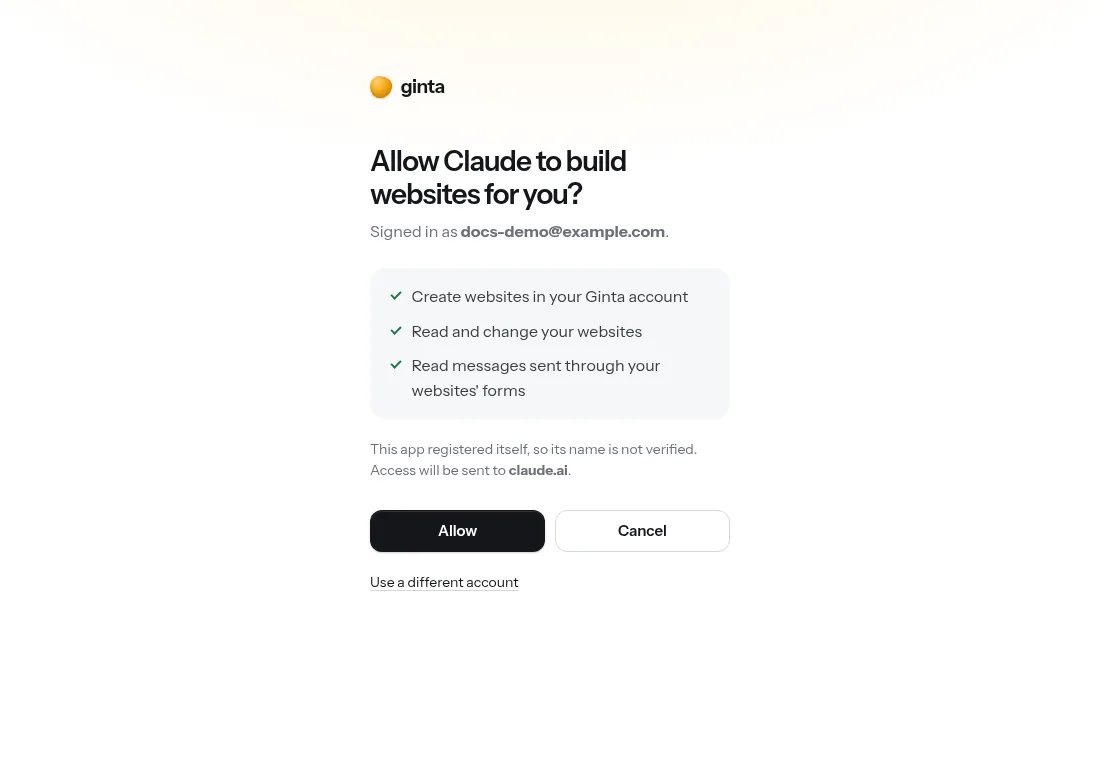
- Click Connect. A Ginta window opens: sign in (or create a free account) and press Allow.
- In a new chat, click + (or type /), open Connectors and make sure Ginta is switched on.
On a Team or Enterprise plan, an owner first adds it under Organization settings → Connectors → Add → Custom → Web with the same URL; members then click Connect under Customize → Connectors. On your phone, add Ginta on the web or in the desktop app once: Anthropic says connectors you connected there show up in the Claude mobile app the next time you sign in. Full steps for every assistant are on Connect Ginta.
What to ask
Give Claude the facts only you know, so the page never shows made-up details:
Use Ginta to make a website for my bike repair shop, Spoke & Chain, at 14 Mill Lane, Leeds. Repairs, servicing and second-hand bikes. Open Tuesday to Saturday, 9 am to 6 pm. Phone 0113 496 0000. People should be able to ask for a repair quote.
Claude first reads Ginta's design guide, then checks the address is free, publishes, and looks at screenshots of the live page to fix what looks weakest. Ginta's guide tells it to ask for real phone numbers, addresses and prices instead of inventing them, to use fitting free photos, and to write in the language you write in. Expect it to take about one to three minutes.
Then keep going, in the same chat or a new one ("on my Ginta site spoke-and-chain…"):
- "Add our prices: puncture repair £10, full service £60."
- "Add online booking for service slots."
- "Show me the messages people sent through the website."
- "Connect my domain spokeandchain.co.uk."
A real run
We timed one on 12 October 2026: one message asking for a yoga studio website in Porto, four tool calls, and the site was live 168 seconds later. That run went through Anthropic's API with the MCP connector, the same tools claude.ai uses. The whole story, including what Claude said it had assumed, is in Build and host a website from Claude with MCP.

What happens after it's live
- It stays online as long as you have your Ginta account, on every plan.
- You can change it anywhere: in Claude, in Ginta's own editor (it shows "Changed by Claude" with a short note of what changed), or by clicking text on the page. Every change is a version you can undo.
- Forms work: messages from the website arrive in your Ginta inbox and by email.
- Ready-made parts: ask for online booking, a menu, a shop, events, a gallery or a blog, and Claude sets them up; you or a helper keep them up to date in Ginta without any AI. Which plans include which part: pricing.
What it costs
Publishing from Claude uses no Ginta credits: Claude does the AI work under your Claude plan, Ginta hosts. The Free plan includes 20 websites at their Ginta address with a small "Made with Ginta" badge. Your own domain comes with paid plans (from €5 a month); the Hosting plan, €5 a month (50 websites, 3 domains, no badge), is made for people who build with their own AI. All plans: pricing.
Sources
- Claude Help Center: Get started with custom connectors using remote MCP (read 19 October 2026)
- Claude Help Center: Use connectors to extend Claude's capabilities (read 19 October 2026)
- Claude docs: Add an unlisted custom connector (read 19 October 2026)
Questions
Can Claude make a website by itself?
It can write the HTML and CSS and show you a preview in the chat, but it can't host it: you'd have to copy the code somewhere and publish it yourself. Connected to Ginta, Claude publishes the site at a real address and can change it later.
Can I do this on the free Claude plan?
Yes. Anthropic lets free accounts add one custom connector (checked 19 October 2026). If you already use your one slot for something else, remove it or use Ginta's own chat at ginta.app instead.
Is Ginta in Claude's Connectors Directory?
Not yet: we've applied. Until then, add it as a custom connector with the address above; it works the same way.
Is the website mine?
Yes. It's in your Ginta account, not in one chat. On Hosting Plus, Hosting Studio, Pro and Agency (from €15 a month) you can also download the code as a .zip.
Can I use my own domain?
Yes, on paid plans (from €5 a month). Ask Claude to connect it: Ginta recognises where your domain is managed and gives the exact steps, then checks when it's live.
I'm a developer. Does this work in Claude Code?
Yes, with one command, and you can deploy a whole framework build too: host a website from Claude Code. Codex and Cursor work the same way: deploy from Codex or Cursor.