How to send website form submissions to Google Sheets
If you can use a Google form, that's the easiest way: Google Forms saves every answer to a Google Sheet by itself. If the form is on your own website, send each submission to a webhook in Zapier or Make and add a step that creates a spreadsheet row, or write a small Google Apps Script that receives it. Below are the steps for each, what they cost and where each one breaks.
We make Ginta, which sends new entries to Zapier or Make on every plan. Facts about Google, Zapier and Make come from their own pages, checked on 9 November 2026.
Option 1: Google Forms (no setup, but a Google form)
Google Forms can send its answers to a new or existing spreadsheet (Google's help):
- Open the form in Google Forms.
- At the top, click Responses, then Summary.
- At the top right, click More → Select destination for responses.
- Pick Create a new spreadsheet or Select existing spreadsheet, then Create or Select.
Every answer from then on is a new row. The catch: it's Google's form, on Google's page, in Google's look. That's fine for a sign-up sheet or a survey, less so for the contact form on your business's website.
Option 2: a webhook through Zapier or Make (no code)
A webhook is a web address that another app gives you. Your website sends each new submission there, and the app does the rest, such as adding a row to a sheet. Your website or form tool has to be able to send webhooks.
- Zapier: the trigger is Webhooks by Zapier → Catch Hook, then the action Google Sheets → Create Spreadsheet Row. Zapier's help says webhook triggers are on the Professional, Team and Enterprise plans, not Free (Zapier help). Professional starts at $19.99 a month billed yearly for 750 tasks; Free has 100 tasks a month and two-step Zaps (Zapier pricing).
- Make: the Webhooks app → Custom webhook, then Google Sheets → Add a Row (Make's Google Sheets modules). Make's pricing page gives the Free plan 1,000 credits a month (Make pricing); each run of a scenario uses some.
Each submission uses tasks or credits, so a busy form costs more than a quiet one.
Option 3: Google Apps Script (free, some code)
You can write a small script attached to the sheet, publish it as a web app, and send your form there. Apps Script runs
a function called doPost when something sends the web app a POST request
(Google's guide), and appendRow adds a row to the bottom of
the sheet:
function doPost(e) {
  const f = e.parameter; // the form's fields, by their names
  SpreadsheetApp.getActiveSpreadsheet().getSheets()[0]
    .appendRow([new Date(), f.name, f.email, f.message]);
  return ContentService.createTextOutput("Thanks!");
}
It costs nothing, but you look after it: access settings, spam, what happens when the sheet changes, and no retries if it fails. Apps Script also answers through a redirect to another Google address (Content Service guide), so the sender has to follow redirects. Ginta's sender doesn't, which is why we suggest Zapier, Make or n8n with Ginta.
How it works on a Ginta website
Each website has one place for this: Settings → General → Send new entries to another app. It sends every new entry the moment it arrives: form messages, shop orders (paid, or sent on WhatsApp), product questions, quote requests, bookings, event sign-ups and reviews visitors send.
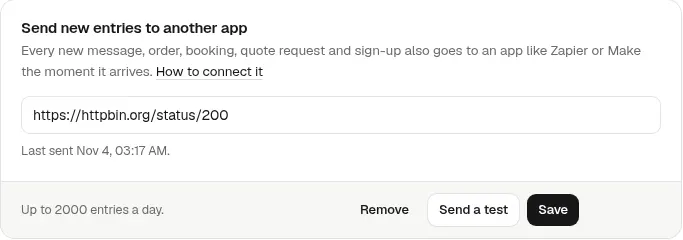
With Zapier and Google Sheets:
- In Zapier, make a new Zap: trigger Webhooks by Zapier → event Catch Hook. Copy the address on the Test tab.
- In Ginta, open your website → Settings → General → Send new entries to another app. Paste the address and press Save.
- Press Send a test. Zapier receives a made-up entry and learns the fields from it.
- Optional: add a filter so only form messages go on: continue only if kind is
message. - Add the action Google Sheets → Create Spreadsheet Row, pick your sheet, and match the columns to
time,fields.name,fields.email,fields.message(a form's fields keep the names they have in the form). - Send a real message through your website. It appears as a new row.
With Make it's the same, starting from Webhooks → Custom webhook; press Redetermine data structure before Send a test. The full list of what Ginta sends, for every kind of entry, is in Connect Ginta to Zapier, Make or n8n.
What else to know:
- Everything still arrives in Ginta's Messages (and by email, if you have that on). The other app gets a copy.
- If the other app doesn't answer, Ginta tries 3 more times: after about a minute, ten minutes and an hour.
- Each request is signed (Standard Webhooks), so a developer can check it came from Ginta. Zapier and Make don't need that.
- It works on every plan. How many entries a website can send a day depends on the plan; Free has a small daily number, paid plans much more.
Where Ginta is weaker
- You need a Zapier or Make account. Ginta doesn't write to Google Sheets directly, and Zapier's webhook trigger is not on its free plan.
- One address per website. To send entries to two places, split them inside Zapier or Make.
- No Apps Script. Ginta doesn't follow redirects, so a plain Apps Script web app isn't a good target.
Questions
Can I send form submissions to Google Sheets without Zapier?
Yes. Use Google Forms, which saves answers to a sheet by itself, or Make, which has a free plan (1,000 credits a month on its pricing page). With some code, a Google Apps Script web app can add the rows.
Is Webhooks by Zapier free?
No. Zapier's help lists webhook triggers on its Professional, Team and Enterprise plans, not on Free (checked 9 November 2026).
Do I need to know how to code?
Not with Google Forms, Zapier or Make. Apps Script needs a few lines of JavaScript.
Will I still get an email for each message?
On Ginta, yes, if email notifications are on. Sending entries to another app adds a copy; it doesn't replace Messages or the email.
What does Ginta send to the webhook?
One JSON message per entry, with kind (message, order, booking…), time, the website, and fields. The
Zapier and Make guide lists every field.
Written with AI help for Ginta, which Povilas runs; he also teaches a website-building course. The screenshots are from the real Ginta on the date above, and prices come from our pricing page.