Do I need a cookie banner on my website?
You need a cookie banner only if your website stores or reads something on visitors' devices that it doesn't strictly need, such as analytics cookies, advertising pixels or embedded maps and videos, and people from the EU or the UK visit it. A website without any of those has nothing to ask permission for and needs no banner; in the United States, no federal law requires one. Below is the rule in each place with its official source, what usually adds cookies without you noticing, and how to check your own site.
This is not legal advice. It's a plain summary of official texts, checked on 9 November 2026. If your business depends on tracking, ask a lawyer or your country's data protection authority.
The rule in the EU
Consent before anything that isn't strictly necessary. Article 5(3) of the ePrivacy Directive allows storing information on a visitor's device, or reading it, only with the visitor's consent, unless it is strictly necessary to provide the service the visitor asked for (Directive 2002/58/EC, consolidated text). "Consent" means what the GDPR says it means: freely given, specific, informed and unambiguous, by a clear action (Article 4(11)), and as easy to withdraw as to give (Article 7(3)) (GDPR on EUR-Lex).
It's not only cookies. The European Data Protection Board's Guidelines 2/2023 on the technical scope of Article 5(3) (version 2.0, adopted 7 October 2024) cover local storage, tracking pixels and URL tracking too. So "we don't use cookies, only a pixel" doesn't get you out of it.
What doesn't need consent: things the website can't work without for what the visitor is doing, such as a shopping cart, a login, or remembering that someone typed the password for a private page.
The rule in the UK
The UK's rule is regulation 6 of PECR. Since 5 February 2026, after changes made by the Data (Use and Access) Act 2025, it says you must not store or read information on a visitor's device except under the exceptions in Schedule A1. Consent is one of them. The others include:
- Strictly necessary for a service the visitor asked for.
- Statistics to improve your own website, with no consent needed only when all of this is true: that is the sole purpose, the data isn't shared except with someone helping you improve the website, visitors get clear information about it, and they have a simple, free way to object.
- Remembering how the visitor wants the website to look or work, with information and a way to object.
Advertising and tracking across websites are not among the exceptions, so pixels still need consent in the UK. The amended regulation is on legislation.gov.uk.
The rule in the US
There is no general federal law that asks for a cookie banner. The Congressional Research Service wrote in August 2025 that Congress has passed privacy laws for particular sectors (health, financial and children's data, for example) rather than one comprehensive consumer privacy law, and that at least 19 states had adopted comprehensive privacy laws of their own (CRS, Preemption and Privacy Law).
Those state laws mostly work by opt-out, not by asking first. California's CCPA is the best known: it applies to for-profit businesses above certain size thresholds, gives people the right to tell a business to stop selling or sharing their personal information, requires a "Do Not Sell or Share My Personal Information" link from businesses that sell it, and requires covered businesses to honor the Global Privacy Control browser signal (California Attorney General: CCPA). That's a link and a promise you keep, not a banner before anything loads. If you sell to people in the EU or the UK, their rules matter for those visitors.
No trackers, no banner
If nothing on your website stores or reads anything that isn't strictly necessary, there's nothing to consent to, and a banner would only get in the way. You still need a privacy page that says what the website does with personal data, for example what a contact form collects. The banner and the privacy page are two different things.
What usually adds cookies without you noticing
Most small websites don't set cookies on purpose. They get them from something they added:
- Embedded Google Maps. Google's privacy policy names "embedded Google Maps" among its products built into other websites, and says those websites share information with Google when you visit them (Google Privacy Policy).
- Embedded YouTube videos. The player loads from Google as soon as the page opens. Google lists YouTube cookies
such as
PREFandVISITOR_INFO1_LIVEon its cookies page. Both embeds, and the fix, are in how to embed Google Maps and YouTube without cookie consent. - Analytics. Google Analytics 4 sets two first-party cookies,
_gaand_ga_<container-id>, each lasting two years by default (Google Analytics help). - Advertising pixels from Meta, TikTok, Pinterest or Google Ads. These always need consent in the EU and UK: see how to add a Meta Pixel legally in the EU.
- Chat widgets, booking widgets and social feeds that load from another company's servers. Check each one's own documentation.
- Google Fonts loaded from Google. These don't need a cookie to matter: the visitor's browser connects to Google, which receives the IP address. In January 2022 a court in Munich ordered a website owner to pay a visitor €100 for passing his IP address to Google this way without consent, noting the fonts could be used without connecting to Google (LG München I, 3 O 17493/20). Hosting the font files on your own website avoids it.
How to check your own website
You don't need a tool, just a desktop browser:
- Open your website in a private window, so nothing from earlier visits is there.
- Open the developer tools (F12 in Chrome, Edge or Firefox).
- In Chrome or Edge, go to Application → Storage → Cookies; in Firefox, Storage → Cookies. Anything listed was set without you clicking anything.
- Go to the Network tab and reload the page. Look at the domains in the list: every one that isn't your own website received your visitor's IP address.
- Scroll down the whole page and look again: some embeds only load when they come into view.
If steps 3 and 4 show only your own domain, you probably don't need a banner. If they show Google, Meta or others, either hold those back until a yes, or remove them.
How Ginta handles it
We make Ginta, so this is how our websites do it. A Ginta website sets no cookies by default, and its privacy page, which Ginta writes from what the website really uses, says so:
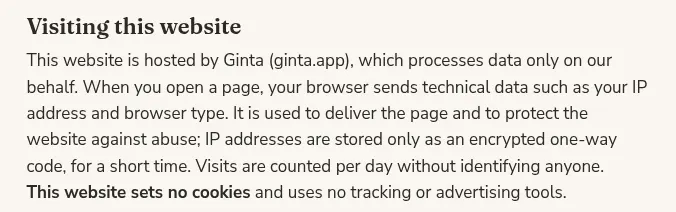
The things from the list above are handled for you:
- Google Fonts are served from the website's own address, so the visitor's browser never contacts Google.
- Stock photos from Pexels are served from the website's own address too.
- Google Maps asks first. A page with a Google map shows Ginta's banner with a Maps choice (the only choice when the website has no trackers). After a yes, Google's map shows at once. Until then, the map is a picture made by Ginta's server, with "Open in Google Maps" and "Show interactive map", which loads only that one map.
- YouTube and other video players load only when the visitor clicks play.
- Visitor stats are counted on Ginta's server, without a cookie: see visitor stats without cookies.
On 9 November 2026 we opened two Ginta demo websites in a fresh browser, hollin-mobile-massage.ginta.page and krume-leipzig.ginta.page, and scrolled to the bottom: every request went to the website's own address, and no cookie or local storage was set. (The Leipzig one has a map, so it shows the banner with its Maps choice; nothing is stored until the visitor answers.)
When you add a tracker, the banner comes by itself (on pages with a Google map it's already there, with only the Maps choice until you add one). Paste a Meta Pixel, TikTok Pixel, Google Analytics 4, Google Ads or Pinterest ID in the website's Settings → Marketing & tracking (every plan, Free included), or ask in the chat. Ginta then adds a banner with Accept, Reject and Settings as equal buttons, loads nothing before Accept, puts "Cookie settings" in the footer and lists the trackers on the privacy page:
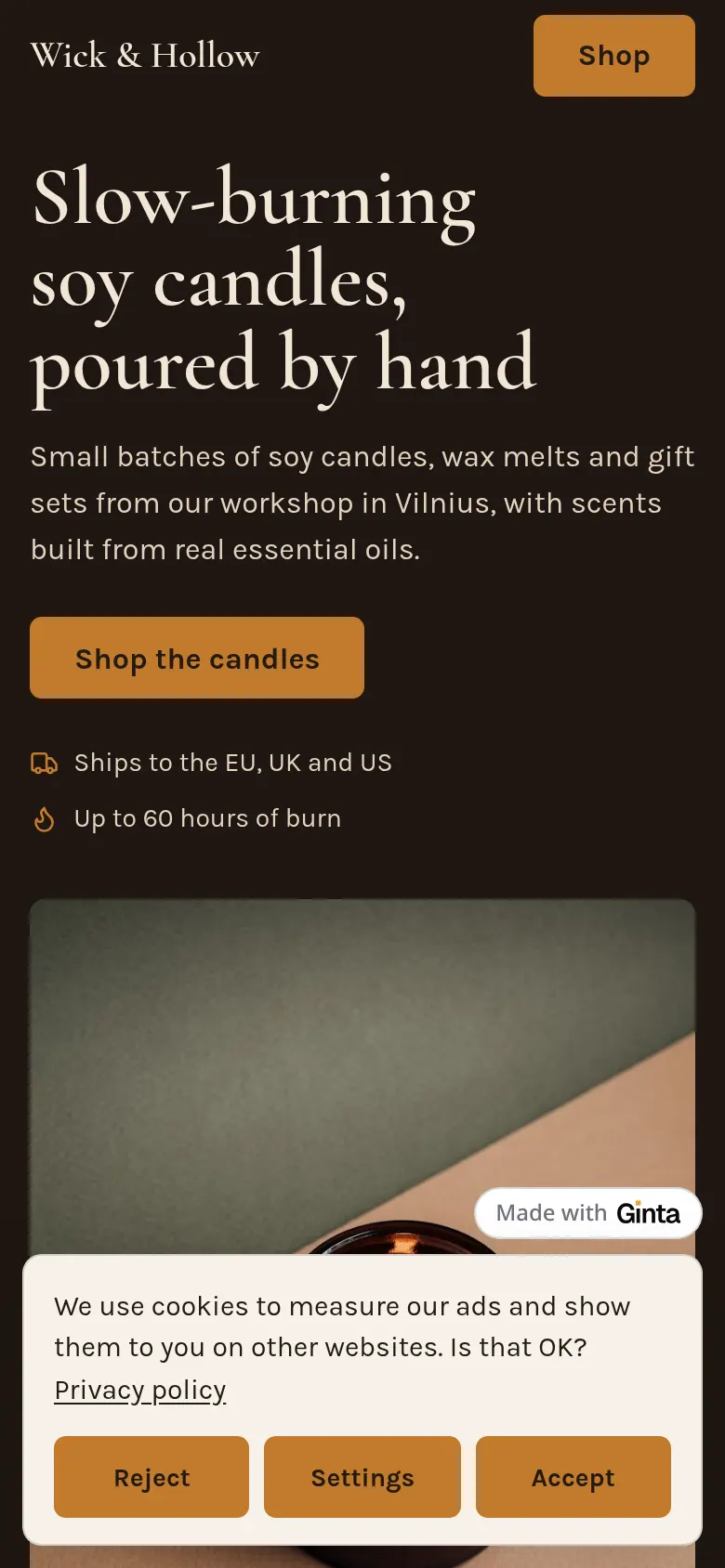
The details are on pixels and the cookie banner and in the tracking docs. The other cookie a Ginta website can set is one you choose too: when you make a website private, visitors who type its password get a cookie that keeps them signed in, which is strictly necessary.
Where Ginta is weaker
- Ginta doesn't keep a central record of each visitor's choice. The answer is remembered on the visitor's own device. Google's EU user consent policy asks sites using its products to keep records of consent; if an ad platform asks you for them, check what it accepts.
- Scripts Ginta doesn't recognize. On paid plans you can add other outside scripts. Known trackers written into the pages by hand are held back until Accept, and anything else is named on the privacy page, but Ginta can't know whether an unknown script needs consent. Put such a script in Settings → Marketing & tracking → Other script, so it waits for the banner.
- Ginta can't fill in your details. The privacy page needs your business name and address; until you add them, it shows a gap where they go.
Questions
Do I need a cookie banner for Google Analytics?
In the EU, yes: Google Analytics 4 sets the _ga cookies, and they aren't strictly necessary, so it needs consent
first. In the UK, since 5 February 2026 statistics cookies can go without consent if they're used only to improve your
website, the data isn't shared for anything else, and visitors are told and can object easily; Google Analytics with
data sharing or ads features on doesn't fit that. If you don't want a banner, a cookie-free tool or your builder's own
stats may be enough: see visitor stats without cookies.
Do I need a cookie banner if my website has no tracking?
No. The rules ask for consent before storing or reading things on the device that aren't strictly necessary. With none of those, there's nothing to ask. You still need a privacy page if you collect personal data, for example through a form.
Do I need a cookie banner in the US?
No federal law requires one. Some state laws, like California's CCPA, require an opt-out link and respect for the Global Privacy Control signal from businesses above certain thresholds that sell or share personal information. If you have visitors from the EU or the UK, their rules apply to them.
Do Google Fonts need a cookie banner?
Fonts loaded from Google don't depend on cookies, but they send the visitor's IP address to Google, and a Munich court found that unlawful without consent in 2022. The simple fix is to host the font files on your own website, which is what Ginta does.
Written with AI help for Ginta, which Povilas runs; he also teaches a website-building course. The screenshots are from the real Ginta on the date above, and prices come from our pricing page.