How to add a Meta Pixel to your shop legally in the EU
To use a Meta Pixel on a shop that EU visitors open, the pixel must not load until the visitor agrees. The agreement has to come from a clear choice in a banner where saying no is as easy as saying yes, the visitor must be able to change their mind later, and your privacy page must say the pixel is there and what it sends to Meta. That comes from two EU laws: the ePrivacy Directive's rule on storing or reading information on someone's device, and the GDPR's definition of consent. Below is each point with its official source, then how Ginta does it for you.
This is not legal advice. It's a plain summary of official texts, checked on 8 November 2026; if your shop depends on ads, ask a lawyer or your country's data protection authority.
Why the pixel needs consent
The device rule. Article 5(3) of the ePrivacy Directive, as amended in 2009, allows storing information on a visitor's device, or reading it, only if the visitor "has given his or her consent", unless it's strictly necessary to provide the service they asked for (Directive 2002/58/EC, consolidated text). A shopping cart cookie can be strictly necessary; an advertising pixel isn't needed to sell someone a candle.
What counts as consent. The GDPR defines consent as a freely given, specific, informed and unambiguous indication of the person's wishes, by a statement or a clear affirmative action (Article 4(11)), and says it must be as easy to withdraw as to give (Article 7(3)) (GDPR on EUR-Lex). The European Data Protection Board explains this in detail in its Guidelines 05/2020 on consent.
Meta says the same. Meta's own developer guide for the pixel and GDPR shows how to pause the pixel until the
visitor agrees: call fbq('consent', 'revoke') before the pixel starts, on every page, and fbq('consent', 'grant')
once consent is given (Meta Pixel: GDPR).
The four things a lawful setup needs
1. Nothing loads before the visitor chooses
The pixel stays off until the visitor presses Accept. A banner that loads the pixel anyway and only asks afterwards doesn't meet the rule above.
2. Reject is as easy as Accept
In 2023 the EDPB's cookie banner taskforce reported that a vast majority of the EU's data protection authorities consider a banner with an accept button but no reject option on any layer to be an infringement, and it looked at button colours and contrast that steer people to Accept (EDPB cookie banner taskforce report, January 2023). France's authority puts it in one line: "Refusing cookies should be as easy as accepting them" (CNIL). The simplest way to be safe: Reject and Accept as buttons of the same size and look, side by side, on the first screen.
3. A way to change your mind
Because withdrawing must be as easy as giving consent, visitors need a way back to the choice. The same EDPB report says website owners should offer "easily accessible solutions" to withdraw at any time, "such as an icon … or a link placed on a visible and standardized place". A "Cookie settings" link in the footer of every page does that.
4. Your privacy page says it
The GDPR requires telling people who receives their data (Article 13). Your privacy page should name the Meta Pixel, what it's for (measuring and showing ads), and that it only runs after consent.
What it looks like in practice
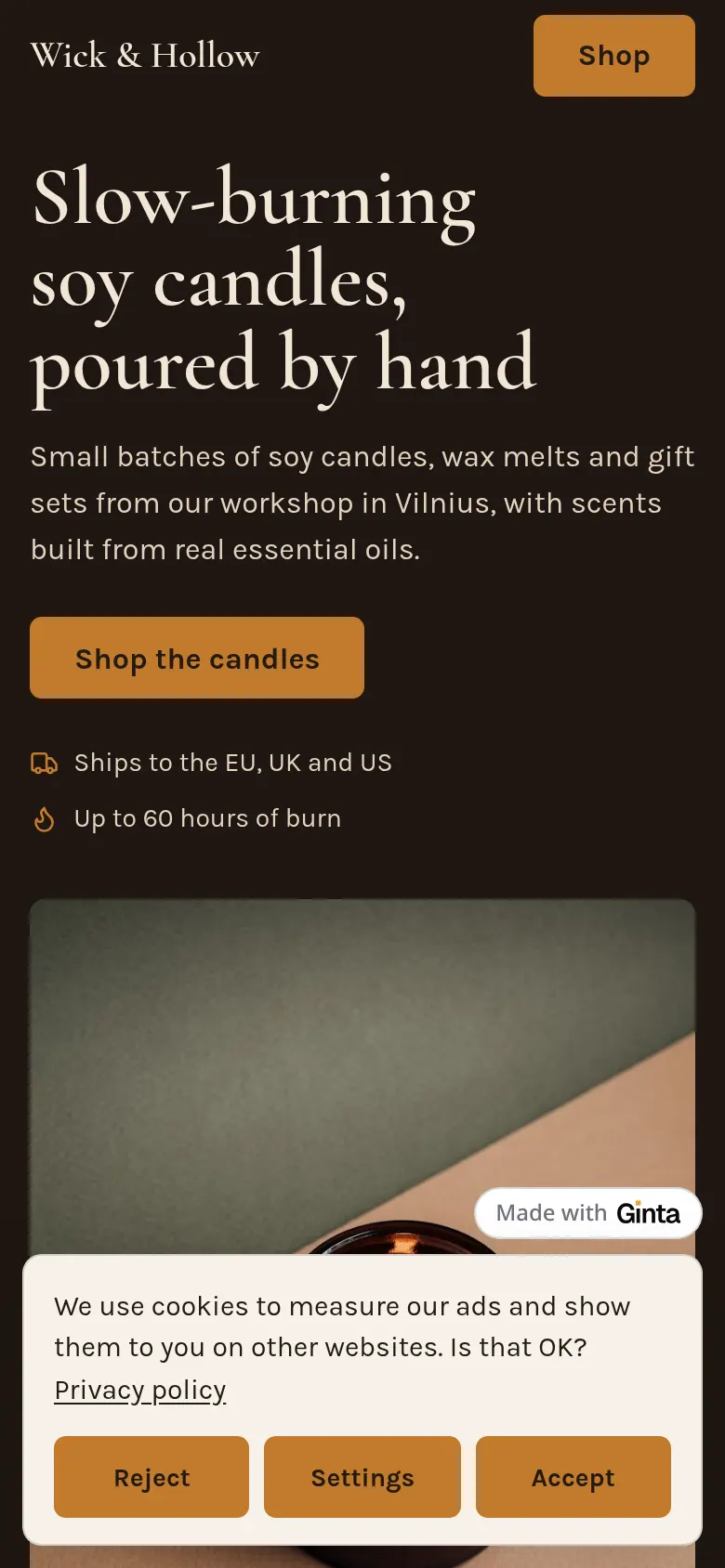
How Ginta does it
We make Ginta, so here's how our shop handles this. You paste your Meta Pixel ID in the website's settings (Marketing & tracking). TikTok Pixel, Google Analytics 4, Google Ads and the Pinterest tag work the same way, by ID, on every plan, Free included. Once a website has any tracker:
- Ginta adds the cookie banner by itself, with Accept, Reject and Settings as equal buttons, in 9 languages.
- Nothing loads before Accept. For Google's tags, Ginta uses Google's Consent Mode v2.
- "Cookie settings" is in every footer, so visitors can change their answer.
- The privacy page lists the trackers the website uses.
- Shop events are sent after consent: product views, add to cart, checkout and purchase, with the order totals from the server rather than from the browser, once the buyer has paid on Stripe's checkout.
You don't write tracking code or a banner yourself. More detail, including what each tracker gets, is on pixels and the cookie banner, and the rest of the Shop is on Ginta Commerce. The banner handles the mechanics; reading your privacy page and deciding what to track is still your job.
If you're adding the pixel by hand on another platform: Meta's base code pasted into a page loads for everyone, before any choice, unless you add the consent calls from Meta's guide and a banner that triggers them.
Do you need the pixel at all?
For a small shop it's worth asking. The pixel matters if you run Meta ads and want to measure which ones lead to orders, or to show ads to past visitors. If you only post on Instagram and don't pay for ads, you may not need it. In Ginta, the Sales view shows revenue, orders and top products without any tracker. The candle shop in the picture above is one of the examples on websites for candle makers.
Questions
Is the Meta Pixel GDPR compliant?
The pixel itself is a tool; whether your use of it is lawful depends on how you set it up. In the EU that means consent before it loads, a Reject option as easy as Accept, a way to withdraw, and a privacy page that names it. Meta's own guide shows how to hold the pixel back until consent.
Can I load the pixel and let visitors opt out later?
Not for EU visitors. The ePrivacy Directive asks for consent before storing or reading information on the device for anything that isn't strictly necessary, and advertising measurement isn't.
Does the cookie banner need a Reject button?
The EDPB's taskforce found that most EU data protection authorities treat a banner without any reject option as an infringement, and France's CNIL says refusing must be as easy as accepting. An equal Reject button on the first layer is the safe choice.
Will I lose data if people press Reject?
Yes, from those visitors. That's the point of the rule. Your own sales figures (orders, revenue, top products) don't depend on the pixel.
Written with AI help for Ginta, which Povilas runs; he also teaches a website-building course. The screenshots are from the real Ginta on the date above, and prices come from our pricing page.