Moving from Shopify or Etsy to your own shop: a step-by-step plan
To move from Shopify or Etsy to your own shop: export your products as a CSV file, build the new shop, import the file, check every product, connect payments, point your domain, and tell your customers. From Etsy, keep your Etsy shop open while the new one finds its feet; your own shop brings no buyers by itself, and traffic is the hard part. The export and import take an afternoon. Getting people to the new shop takes months.
We make Ginta, and the import screen below is Ginta's. The export steps come from Shopify's and Etsy's own help pages, checked on 8 November 2026.
Step 0: decide why you're moving
Be clear about it, because it decides how you move:
- From Etsy, to keep more of each sale and own the customer. Etsy charges 6.5% of each order plus payment processing (in the US 3% + $0.25) and $0.20 per listing (Etsy fee basics, payment processing). But Etsy also brings buyers who are searching. Don't close it; add your shop next to it.
- From Shopify, to pay less each month. Shopify Basic is €27 a month, or €19 paid yearly, as shown to a European visitor (Shopify pricing). If you use apps, POS, digital products or subscriptions, check the new shop has what you need first: Ginta vs Shopify lists what Ginta can't do.
Step 1: export your products
From Shopify. In your Shopify admin, open Products, click Export, choose which products (for example all of them), choose CSV for a spreadsheet program, and click Export products (Shopify help: exporting products).
From Etsy. In Shop Manager go to Settings, then Options, then Download Data, and click Download CSV. Etsy's help page says the file covers your active listings with title, description, price, currency code, quantity, tags, materials and image URLs (and SKUs if you set them) (Etsy help: download your listing information). The page doesn't mention variations, so plan to check sizes and colours by hand after the import.
Keep the file. It's also a backup of your catalogue.
Step 2: make the new shop
On Ginta you describe the business in a few sentences, what you sell, your prices, delivery and pickup, and the website is built with a shop in it, about a minute later. The shop lives inside a real website: your story, contact, delivery and returns pages around the products. You can also have your own Claude or ChatGPT build it through Ginta's MCP server.
Step 3: import the CSV
In Ginta, open the Shop, choose Import from CSV and pick the file. Ginta recognises Shopify, Etsy and WooCommerce exports (or any spreadsheet saved as CSV), matches the columns, and shows what it will import before anything is saved. Products with the same name as an existing one are updated, not doubled.
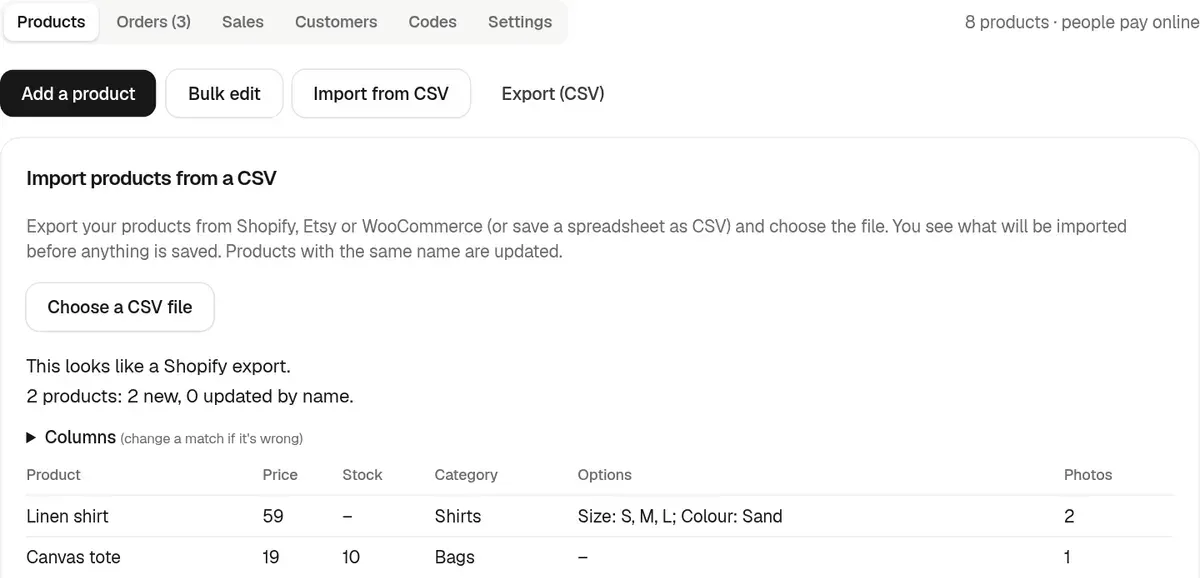
If a column is matched wrongly (say, a "compare at" price read as the price), change the match in the preview and look again. More on CSV import and export. Ginta also exports your products as a CSV in Shopify's format, so you're never locked in.
Step 4: check every product
An import moves data; it doesn't check it. Go through each product:
- Price and sale price. The "was" price shows struck through with a percentage off.
- Options. Sizes and colours as up to two kinds of options per product, each combination with its own price, stock and photo. Etsy's file doesn't list variations, so add them here.
- Photos. Up to 10 per product. Ginta copies the imported photos from your old shop into your website after the import, so they keep showing when the old shop closes; any it couldn't copy are marked "Re-upload photo". Wait for the copy to finish before you close the old shop.
- Stock. Set it per combination, so you never sell what you don't have.
- Categories and tags, so the shop's filters and category pages make sense.
Then the shop settings: delivery options and prices (flat, by weight or by order total, free from an amount), pickup if you have it, whether prices include VAT, and your returns text. For selling shops Ginta adds Seller information and Returns and right of withdrawal pages, written as a starting point for you to check rather than legal advice.
Step 5: connect payments
Connect your own Stripe account. Buyers pay by card, Apple Pay or Google Pay on Stripe's checkout, the money goes to your Stripe account, and Ginta takes 0%. Stripe charges its card fee, for example 1.5% + €0.25 for a standard EEA card (Stripe pricing). If you used Shopify Payments or Etsy Payments, this is a new account, and Stripe checks your website before it lets you take payments (Stripe is asking for a business website, how Stripe works on Ginta). Ginta has no PayPal.
Place one test order yourself before telling anyone.
Step 6: your domain and old addresses
If you had your own domain on Shopify, point it at the new shop. On Ginta an own domain needs a paid plan, from
€5 a month (Hosting, if you build with your own Claude or ChatGPT) or €19 on Light; on the
free plan the shop lives at name.ginta.page (pricing).
Your old product addresses won't match the new ones, and links to them (from Google, Pinterest, old posts) will break.
Make a list of your most-visited old addresses and send each one to its new page. On Ginta a website can have a
_redirects file for this, one line per old address (files and redirects).
Etsy listings keep their Etsy addresses, which is one more reason to keep Etsy open.
Step 7: tell your customers
- Your own list. Email the people who agreed to hear from you. For Etsy orders, a card in each parcel with your web address is the simplest way to tell buyers.
- Your profiles. Change the link in your Instagram, TikTok and Pinterest bios to the new shop, and link products from posts to their own pages.
- Packaging and labels. Print the web address on everything that leaves the studio.
- A reason to visit. A discount code for a first order, or a product only sold on your own site.
Step 8: be honest about traffic
This is the hard part, and no shop builder solves it. On Etsy, buyers find you through Etsy's search. Your own shop only gets the visitors you bring: from social media, your packaging, markets, Google over time, and people who come back. Ginta brings no buyers by itself.
That's why the plan for an Etsy seller is "add", not "replace". Keep Etsy for discovery, send repeat buyers and your followers to your own shop, and watch the Sales view to see what each brings. If after a few months most orders come from your own shop, you can decide about Etsy then. Ginta vs Etsy compares the two side by side, and everything the Shop does is on Ginta Commerce.
Questions
Can I move my products from Etsy to my own website?
Yes. Download your listings as a CSV from Etsy's Shop Manager (Settings → Options → Download Data) and import the file into your new shop. Ginta reads Etsy's file and shows a preview first; check sizes and colours afterwards, because Etsy's export doesn't mention variations.
How do I migrate from Shopify without losing my products?
Export all products as a CSV from Shopify's Products page, import the file into the new platform, and check prices, options, photos and stock before switching your domain. Keep the CSV as a backup.
Should I close my Etsy shop when I open my own website?
Usually not at first. Etsy brings buyers who are already searching; your own website only gets the visitors you send. Run both and decide once you see where your orders come from.
Will my Google rankings move with me?
Not automatically. New addresses start fresh; redirecting your most-visited old addresses to their new pages helps people and search engines find them.
Written with AI help for Ginta, which Povilas runs; he also teaches a website-building course. The screenshots are from the real Ginta on the date above, and prices come from our pricing page.