How to take your website offline temporarily without deleting it
To take a website offline for a short while without losing it, show a "temporarily unavailable" page with the HTTP status code 503: it tells visitors and Google that the break is temporary. For more than a few days, Google suggests keeping the website up with a notice instead, because a long outage can cost you your place in search. Below: when each way fits, what Google says, and how to do it on Ginta with one setting.
We make Ginta. The Google facts come from Google Search Central, checked on 9 November 2026.
Why take a website offline at all
Common reasons: you're closed for a holiday or a renovation, you're rebranding and don't want the old site seen, a product or service is paused, or something on the website is wrong and needs fixing before anyone sees it.
For most of these, you don't need the website gone. You need people to know you're closed and to stop ordering.
What Google says
Google Search Central has a page on pausing or disabling a website. In short:
- A full shutdown with a 503 page is for a very short time: Google's words are "a few days at most".
- For a longer closure, keep a home page that search engines can index (a normal page, status 200) that says you're closed, and turn off what can't work, such as the cart.
- Don't pause a website with 403, 404 or 410 pages: Google says that removes its pages from search.
- While pages answer 503, Google can't update their titles or descriptions in search.
- There's no fixed time for a website to recover after it was removed completely.
Three ways to pause, from gentlest to strongest
- Stay online with a notice (best for holidays and anything longer than a few days). Put "Closed until 6 January" at the top of the home page, say how to reach you, and switch off ordering or bookings.
- A 503 "temporarily unavailable" page (a few days at most). Good when nothing on the website should be seen or used: a broken page, a legal question, a rebrand reveal.
- A password (while you rebuild). Visitors and search engines see only the password page, so for search it works much like being offline; the same "short is safer" rule applies. See how to password-protect a website for free.
Deleting the website is not on the list: you lose the pages, and their place in search starts again from zero.
How to take a Ginta website offline
Every Ginta website, on every plan, has a setting for this.
- Open your website → Settings → General → Who can see it.
- Choose Offline and press Save.
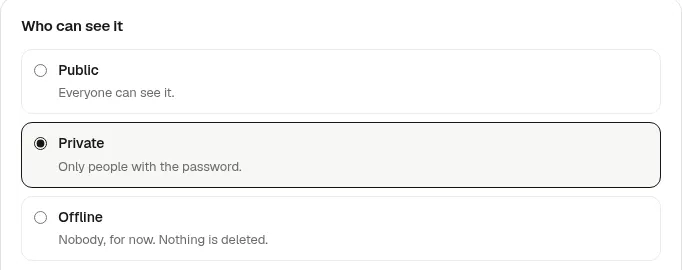
What happens:
- Every address of the website, on its Ginta address and on your own domain, answers with a short "This website isn't available right now" page and the status 503, which also tells search engines to try again in an hour.
- Forms take no messages, and the Shop, bookings, events and quote requests take no orders. Anyone who tries is told the website isn't taking messages or orders right now.
- Nothing is deleted. You still see and edit the real website in Ginta, and Open site shows it to you.
- Your domain stays connected and your plan stays as it is.
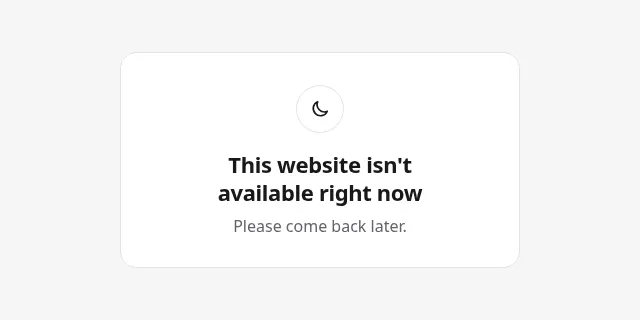
To come back, choose Public and press Save. The website is back at once, and Ginta tells search engines that use IndexNow that it changed.
For a holiday or anything longer than a few days, stay Public instead and ask Ginta's editor for a notice, such as "Add a line at the top: closed until 6 January, orders open again on the 7th."
Where Ginta is weaker
- The offline page can't be changed. It says the website isn't available and to come back later, in the website's language. You can't add a reopening date or a phone number to it; for that, stay Public with a notice.
- It covers everything, robots.txt too. That's right for a few days. For weeks, Google's advice is a normal home page with a notice, not a 503.
- No timer. Offline stays on until you switch it back; there's no "reopen on the 7th".
Questions
Will taking my website offline hurt my Google ranking?
A few days with a 503 page shouldn't: Google treats it as temporary. Weeks of it can, and Google says there's no fixed time to recover after a website was removed. For long closures, keep the website up with a notice.
Should my "closed" page use 503 or 404?
- A 404 or 410 says the page is gone, and Google may drop it from search.
Do I lose my domain or my content while the website is offline?
Not on Ginta: nothing is deleted, the domain stays connected, and Public brings everything back at once.
Can customers still reach me while the website is offline?
Not through the website's forms. Keep your phone number or email on your Google Business Profile and social pages: how to get your business on Google.
Written with AI help for Ginta, which Povilas runs; he also teaches a website-building course. The screenshots are from the real Ginta on the date above, and prices come from our pricing page.