How to get your business on Google for free: the profile, the website, the first weeks
To get your business on Google for free, do two things: create a Google Business Profile (that's what shows you on Maps and in local results), and give it a website that says plainly what you do, where and how to reach you, which Google finds by itself. Both are free; the first weeks are about checking that the details match everywhere. Below: Google's own steps, what the website needs so Google understands it, and a real window cleaner's website, built in 87 seconds on Ginta's free plan.
Everything about Google here comes from Google's own help pages, checked on 29 October 2026 and linked. Ginta is our product.
Step 1: create your Google Business Profile
This is the box with your hours, phone, reviews and directions that shows on Google Maps and next to local searches.
- Go to business.google.com/add and choose Add your business to Google. It's free: Google says you can add or claim a business "at no charge" (Add or claim your Business Profile).
- Name: your real business name. Google's guidelines say "including unnecessary information in your business name isn't permitted", so no "Best Window Cleaner Exeter" (guidelines).
- Address or areas: if customers come to you, your address. If you go to them and work from home, you're a service-area business: Google says "you should hide your business address from customers" and list the areas you serve instead (service areas).
- Category, phone, hours and website. Use the same phone number and hours as on your website.
- Verify. Google lists phone or text, email, a live video call and a postcard; reviews of your verification can take "up to 5 business days", and a postcard usually arrives within 14 days (verify your business).
Already on Maps because a customer added you? Search for your business on Google Maps and choose Claim this business.
Also free: Bing Places for Bing and Bing Maps, and Apple Business Connect for Apple Maps.
Step 2: give Google a website it can read
Your profile links to your website, and your website is what Google reads to understand what you do. Google finds new websites by itself: "Google automatically looks for sites to add to our index", though "it can take a few weeks" (Get on Google).
What makes a small business website easy for Google (and for people) to understand:
- What, where and how, as text, on the first screen. "Window cleaning in Exeter & Exmouth" with a phone button, not a slogan on a photo.
- Prices, hours and areas as text, not inside images or PDFs.
- One page title and description per page that say what's on it.
- Structured data: a small block of code that tells Google your business type, phone, hours and areas.
- Fast on a phone. Most local searches happen on one.
- The same name, phone and areas as your Business Profile.
A real example: a window cleaner who works from home
Brightpane Window Cleaning is made up for this post. The website, timings and credits are real, from 29 October 2026: brightpane-window-cleaning.ginta.page.
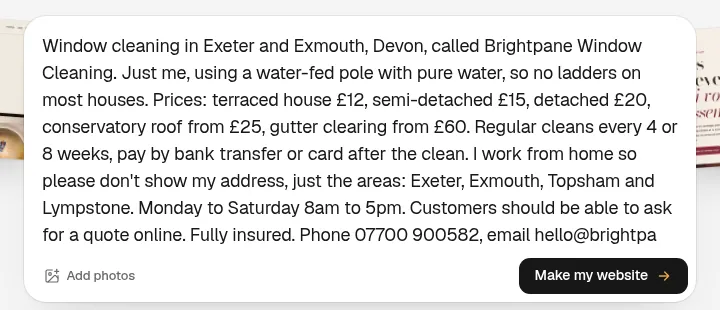
The website was live 87 seconds later and used 18.1 credits, with no questions and no repair round.
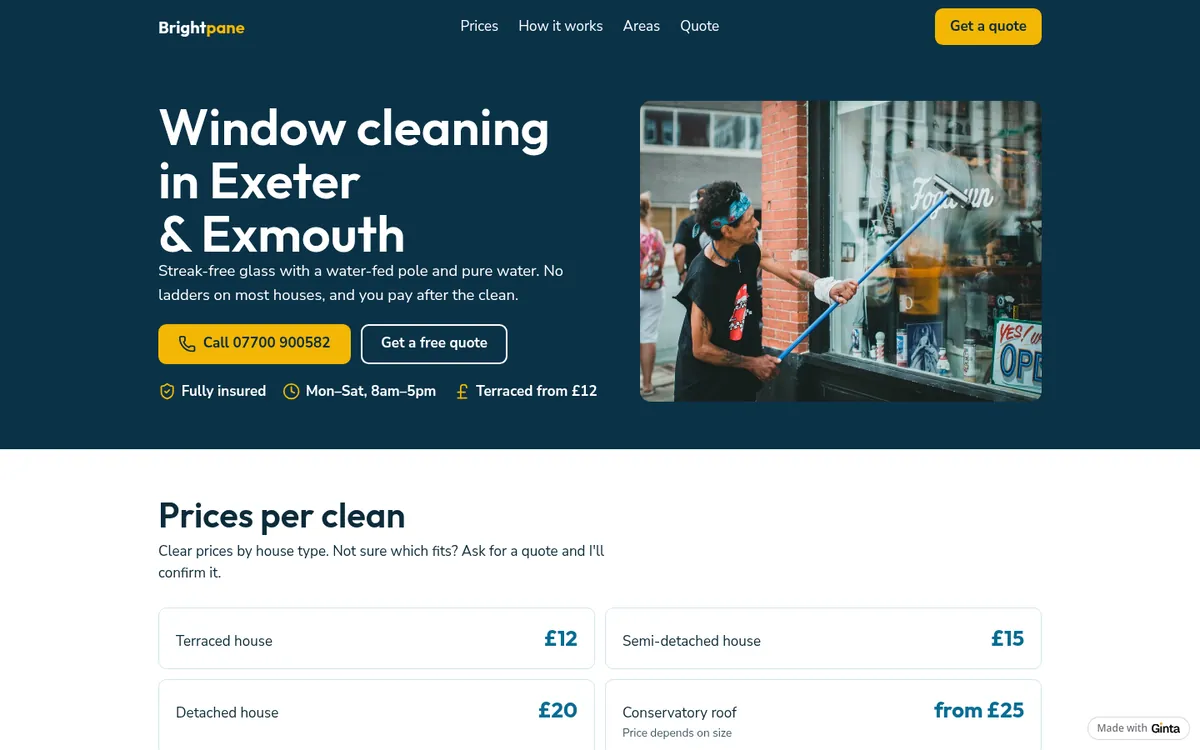
What Ginta did for Google, without being asked:
- The page title: "Brightpane Window Cleaning · Exeter, Exmouth, Topsham & Lympstone". The description: "Water-fed pole window cleaning in Exeter, Exmouth, Topsham and Lympstone. Terraced from £12. Fully insured. Ask for a free quote online."
- Structured data: a
LocalBusinesswith the name, phone, email, opening hours and the four areas served, and no address, because I asked for none. That's the same rule as Google's for service-area businesses. - A sitemap listing every page, and fast pages: PageSpeed is measured for every Ginta site.
(One honest note: our example is a made-up business, so its account keeps it out of search engines on purpose. A real Ginta website, free plan included, can be found by Google.)
The same next steps are kept in each website's Settings → Address & domain, under "Get found on Google".
Step 3: the first weeks
- Put the website on the profile, and the same link on Facebook and Instagram.
- Check the details match on your profile, website and social pages: name, phone, hours, areas.
- Ask your first customers for a Google review. Your profile gives you a link to share. Never pay for reviews or write your own.
- Optional: Google Search Console. Google suggests it to check for errors and to send your most important pages
(Search Console). To see what Google has, search
site:yourwebsite.com; Google notes this "doesn't necessarily return all the URLs that are indexed". - Your own domain (like
brightpane.co.uk) is easier to remember and say on the phone than a builder's address: how to connect your own domain. On a paid Ginta plan you can also find and buy one in Settings → Address & domain for €29 a year. - Check your website's speed on a phone: our free website checker reads Google's PageSpeed scores in plain words.
What it costs
Google Business Profile, Bing Places and Apple Business Connect are free. A Ginta website is free at a
name.ginta.page address with a small "Made with Ginta" badge; this build used 18.1 credits, and every new account
gets 25 when it confirms its email, plus 5 a day. Your own domain starts at €5 a month
(with your own Claude or ChatGPT) or €19 on Light. See pricing.
More on getting found
- Do I need a website if I have Instagram or a Google Business Profile?
- How to make a bilingual website, if your customers speak two languages.
- Websites by type of business, each with what customers search for.
Questions
Is it free to put my business on Google?
Yes. Adding or claiming a Google Business Profile is free, and Google finds websites by itself at no cost. Be wary of anyone charging to "register you with Google".
How long does it take to show up on Google?
Verification of a Business Profile can take up to 5 business days (a postcard up to 14 days). Google says it can take a few weeks for it to notice a new website.
Can I be on Google Maps without showing my address?
Yes. Set your profile up as a service-area business: hide the address and list the towns or areas you serve.
Do I need a website to be on Google?
No: a Business Profile alone shows you on Maps. A website gives Google, and customers, the details a profile can't hold: your prices, your services, how you work, and a way to book or ask for a quote.
Does Ginta submit my website to Google?
Google finds new websites by itself. Ginta gives every page a title, description and structured data, keeps a sitemap, and tells Bing and other IndexNow search engines when a page changes.
Written with AI help for Ginta, which Povilas runs; he also teaches a website-building course. The screenshots are from the real Ginta on the date above, and prices come from our pricing page.