How to hand over a website to a client
To hand over a website to a client, make sure the client owns the domain, has their own login, takes payments into their own account, has a copy of the files, and knows who pays for hosting and who makes changes from now on. Most builders, Ginta included, can also move the whole website into the client's own account; on Ginta both accounts need a paid plan, and the client accepts the move within 7 days.
Below: the checklist first (it works on any platform), then how Wix, Webflow, Framer and Lovable do the move, checked on their own help pages on 9 November 2026, then how it works in Ginta. Ginta is our product, so read that part as one side's description, with the weak spots included.
The hand-over checklist
Go through these with the client before you call the job finished. Each one is a question someone will ask you a year from now if you skip it.
- The domain is in the client's name. The client should be the registrant at the registrar, with their own login there. If you bought it for them, transfer it to their account now. Whoever controls the domain controls the website and the email on it.
- The client has their own login, not yours. Either the website moves to their account, or they get a login that only reaches their website. Never hand over your own password: you can't take it back without breaking everything else you run with it.
- Payments go into the client's account. Card payments, refunds, chargebacks and the tax on the sales belong to the client's business, so they belong in the client's Stripe (or PayPal, or bank) account, not yours.
- The client has a copy of the code and content. A .zip of the files, an export of products and orders, the photos they gave you. If you disappear, the website shouldn't disappear with you.
- It's clear who pays for hosting. Either the plan is in the client's account on the client's card, or it stays in yours and you invoice them. Write down which, and what happens if they stop paying.
- It's clear who makes changes. Can the client change prices and opening hours alone? Who changes the design? Are you still on the account afterwards, and with what rights? Agree on it in writing.
- Messages and orders reach the client. Form messages, orders and bookings should go to an email address the client reads, not to yours.
How the common platforms move a website to a client
Wix
Wix moves a site with Transfer site in the site's dashboard. You need the email of the new owner's Wix account, and the new owner has to accept the invite: Wix says "The invite expires in 3 days." Your payment details don't move: "the new site owner will manage all future subscription payments." You can choose to stay on the site as a collaborator, or keep a copy in your account. One limit to know before you set up a shop: "It is not possible to transfer Wix Payments accounts between Wix accounts." (Transferring a Premium Site to Another Wix Account, checked on 9 November 2026.)
Webflow
Webflow's transfer is built for exactly this: "Transferring a site with an active Site plan to another Workspace is intended for Freelancers and Agencies handing off a site to a client's Workspace." Only Workspaces on the Freelancer or Agency plan can transfer a site with a paid Site plan. The client accepts, and the site moves "along with the Site plan and any connected custom domains." Afterwards the client can add you back as a guest. (How do I transfer a site or plan to another workspace?, checked on 9 November 2026.)
Framer
In Framer you open the project and pick File → Transfer Project, enter the client's email and choose whether to stay an editor. The client accepts by email. "Any active site subscription is canceled when the transfer is accepted", and the client chooses and pays for their own Site plan; connected custom domains keep working. (Framer Help: Transfer a project to another user, checked on 9 November 2026.)
Lovable
Lovable lets you move a project between workspaces you belong to, or transfer ownership. Transferring to someone outside your workspace is a Business and Enterprise feature: "On Business and Enterprise plans, you can also enter the email address of a Lovable account outside your workspace." The person gets a transfer request to accept. Lovable's page doesn't say what happens to a custom domain. (Lovable: Project settings, checked on 9 November 2026.)
Where they are better than Ginta: Wix, Webflow and Framer let you stay on the website after the hand-over with a collaborator, guest or editor role, so you can keep working on the design for the client. Ginta has no shared design role: after a move, only the client's account changes the pages (more below).
How it works in Ginta
You have two good ways. Pick one per client.
Option 1: move the website to the client's own Ginta account
The client gets everything, and you're out of the picture unless they invite you back as a helper.
- The client makes a Ginta account and picks a paid plan (it can be the cheapest one, Hosting at €5 a month, if they'll make changes with their own Claude or ChatGPT).
- In the website's Settings → More, find Move to another account, type the client's Ginta email and press Send.
- The client gets an email and a card on Your websites with Accept and Decline. The request works for 7 days and only once; you can cancel it until they accept.
- When they accept, the website is theirs and leaves your list.
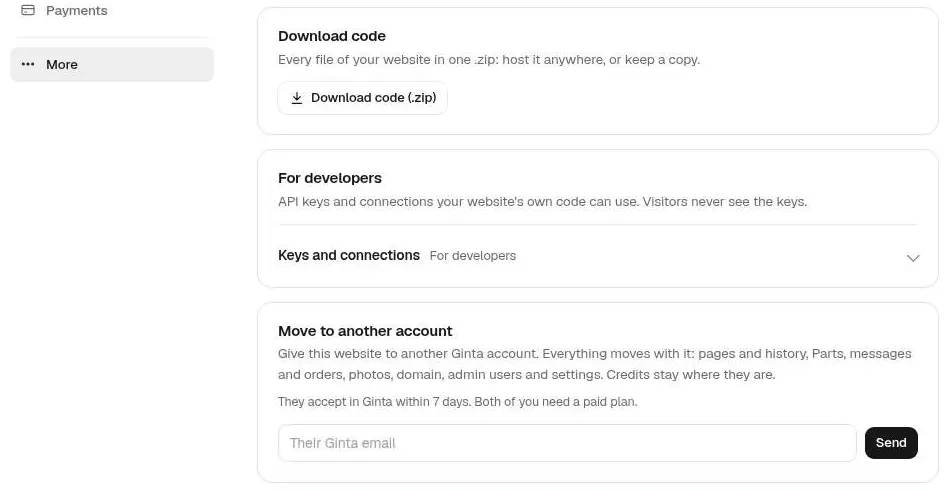

What moves with the website: its pages and history, its Parts (menu, shop, bookings, events and the rest) with their content, messages and orders, photos, a connected domain, admin users and settings. What doesn't: credits stay in each account, and the form-email address is cleared (it was confirmed for you, so the client sets their own).
Before you send it, check these:
- Both accounts must be on a paid plan, with payments up to date. Not the Free plan, and not a €1 trial. Ginta checks this when you send the request and again when the client accepts. The client's plan also needs room for one more website, its domain and its photos.
- A domain bought through Ginta can't move yet. Ginta registers those in the name of the account that bought it, so for a client website, let the client buy the domain at a registrar in their own name and connect it. A connected domain moves with the website.
- Payments: if the website has its own Stripe (the client's, see payments into the client's own Stripe), it stays connected after the move. If it was using your account's Stripe, card payments pause after the move until the client connects their own. Ginta says so in the request, the email and the card, before anyone accepts.
Option 2: keep the website in your account and give the client their own login
This suits clients who want to update their prices and read their messages, but not deal with plans and design.
- In the website's Settings → More → Admin users, add the client's email (with a password you give them, or without one: then Ginta emails them a link to choose their own).
- The client signs in at their website's own address plus /admin, for example
theirdomain.com/admin. They change the menu, prices, products, bookings and events, and read messages. They never see your Ginta account or your other clients. How it works step by step: let a client edit their website without your login. - Point the website's form email at the client's address, so messages and orders reach them directly. Their message emails then open their /admin, not Ginta.
- Connect the client's own Stripe for this website only: Ginta makes a one-time link you send them (7 days, once, no Ginta account needed).
You keep paying for the plan and invoice the client, as agreed in point 5 of the checklist.
Either way: give them the code
Download code (.zip) is in the same Settings → More section, on every plan, Free included. It gives every file of the website in one .zip with a README-GINTA.txt that explains what only works on Ginta. Honest limit: the Parts (shop, bookings, menu and so on) are filled in live by Ginta, so in the .zip they are empty placeholders, not a working shop. The products, orders and bookings stay in Ginta; the shop's products and orders also export as CSV files.
Where Ginta is weaker
- Moving needs a paid plan on both sides. A client on the Free plan can't receive a website, and neither can a client in a €1 trial. Wix moves free sites too (Transferring a Free Site to Another Wix Account, checked on 9 November 2026).
- A domain bought through Ginta can't be moved to the client. Use a domain registered in the client's own name.
- No shared design role. After a move, you can't keep editing the design from your account. The client can add you as an admin user for content and messages, but page changes are theirs to make (in Ginta's chat, or with their own AI).
- Credits don't move, so a client on a plan with Ginta's AI starts with their own plan's credits.
Questions
Can I transfer a website I built in Ginta to my client?
Yes: Settings → More → Move to another account, then the client accepts in Ginta within 7 days. Both accounts need a paid plan with payments up to date.
Does the domain go with the website?
A domain you connected (bought anywhere else) moves with the website and is counted on the client's plan. A domain bought through Ginta can't move yet.
Can my client update the website without their own Ginta account?
Yes. Add them as an admin user of that website: they sign in at the website's address plus /admin with their email and a password, and change content like menus, prices, products and bookings, and read messages.
What happens to the shop's payments when I hand it over?
If the website takes payments into the client's own Stripe, nothing changes. If it used your Stripe, card payments pause after a move until the client connects theirs.
Can I keep a copy of the website?
Yes. Download code gives you every file as a .zip, on every plan. The Parts' content (products, bookings) isn't in it.
Written with AI help for Ginta, which Povilas runs; he also teaches a website-building course. The screenshots are from the real Ginta on the date above, and prices come from our pricing page.