Ginta Commerce
Import products from Shopify, Etsy or WooCommerce with a CSV file
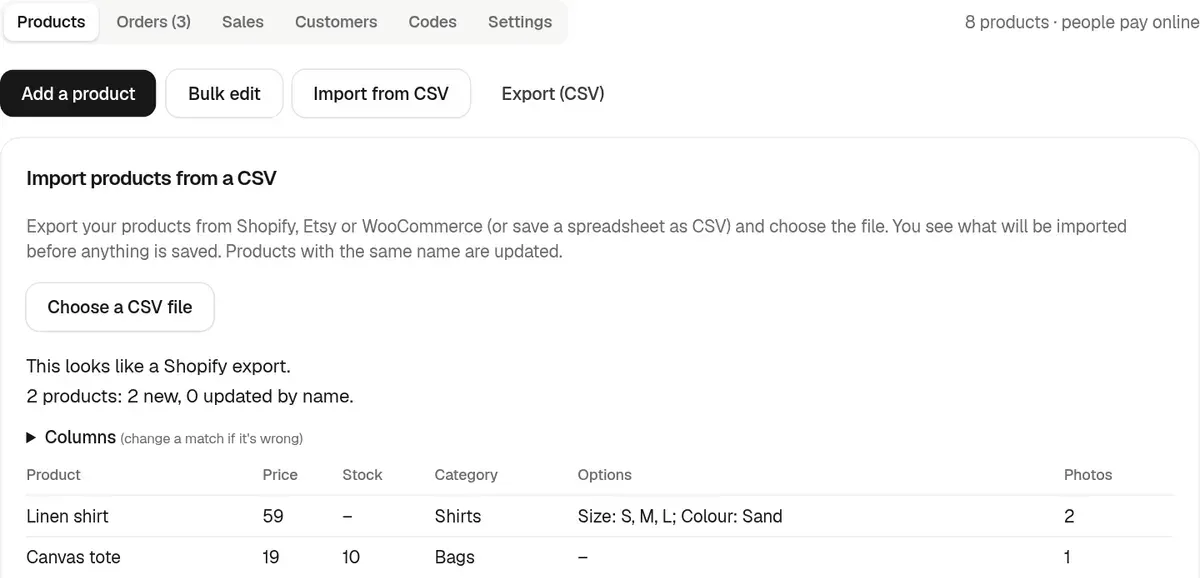
Ginta's shop imports the product CSV that Shopify, Etsy and WooCommerce export, or any spreadsheet with a name column. It recognises the format, matches the columns, shows you a preview, and only then imports: names, descriptions, prices, sale prices, stock, categories, tags, photos, and up to two kinds of options with every combination. A product with the same name as one already in your shop is updated instead of added twice. Then Ginta copies every photo from your old shop's servers into your website, in the background, so nothing depends on the old shop any more.
Step by step
- Export from your old shop. Shopify: Products → Export (CSV for Excel or plain CSV). Etsy: Shop Manager → Settings → Options → Download Data → Download CSV for your listings. WooCommerce: Products → Export. Each platform's help pages have the current steps.
- In Ginta, open your website's Parts tab → Shop → Products → Import from CSV, and choose the file. You can also do it on your website's /admin, or ask Claude or ChatGPT to import it through Ginta's MCP server.
- Check the preview. Ginta says which format it found ("This looks like a Shopify export"), how many products are new and how many it will update, and shows the first products with price, stock, category, options and photos. Wrong match? Open Columns and pick the right column.
- Import. The products appear in your shop with their own pages straight away.
- The photos are copied. Right after the import Ginta fetches each photo (products and their sizes or colours), shrinks it to 1600 px on its longest side, saves it with your website and puts the copy in place. The import screen shows how far it is ("Copied so far: 120 of 180"); you can leave the page, it carries on by itself. Then set delivery and payments if you haven't yet.
What comes across
| From the CSV | In Ginta |
|---|---|
| Title / Name | Product name (and its page address) |
| Description (HTML) | Plain paragraphs |
| Price, Compare-at / Sale price | Price and "was" price |
| Stock / Inventory quantity | Stock count |
| Type / Category / Section | Category |
| Tags | Tags (buyers can search by them) |
| Option 1 and 2 (Size, Colour…) | Options, with each combination's price and stock |
| Image URLs | Photos (up to 10 per product), copied into Ginta |
What to watch out for
- Photos count towards your plan's photos (Free 400, Light 2,000). If they run out mid-copy, the rest stay linked to the old address and Ginta tells you; free a few or move to a bigger plan, then press Copy photos into Ginta again.
- A photo that can't be copied (the old address is gone, or the server doesn't answer after three tries) is listed with the reason, and its product gets a Re-upload photo mark. Upload that one by hand in the product.
- More than two kinds of options (size, colour and material) don't fit: Ginta has up to two per product and 100 combinations. Split such a product in two, or fold one option into the name.
- Product limits: the Free plan holds 25 products per website; paid plans up to 500. Larger catalogues don't fit on Ginta.
- Orders, customers and reviews aren't in a product CSV and aren't imported.
- Digital products and subscriptions can't be sold on Ginta, so leave them out.
Products you imported before
Shops imported before photos were copied (November 2026) still link to the old servers. Ginta shows how many under
Shop → Products, with a Copy photos into Ginta button that does the same copy. From Claude or ChatGPT, the shop's
copy_photos action does it.
Going the other way
Ginta exports your products as a CSV in Shopify's product format (one row per combination), which Shopify, WooCommerce importers and spreadsheets can read. Your shop is never locked in. A whole plan for the move, with redirects and keeping Etsy open: moving from Shopify or Etsy to your own shop.
Questions
Can I import from a Google Sheet or Excel?
Yes. Save it as CSV with a column for the name (and ideally price, description and photo links). Ginta matches the columns it recognises, and you pick the rest in Columns.
Will importing twice create duplicates?
No. Products with the same name are updated, so you can fix the file and import it again.
What happens to the photos?
They're copied into Ginta after the import: fetched once from your old shop, shrunk to 1600 px, saved with your website and swapped in everywhere the product uses them. You can close the old shop once the copy says it's done.
Does it import my Shopify customers or orders?
No, only products. Your past orders stay in your old platform's export.
Can I edit many prices after importing?
Yes. Bulk edit changes prices, sale prices and stock of many products at once, also "change all by %".


