How to show your Google reviews on your website (free, and without a widget that slows it down)
The simplest way is a "Read our reviews on Google" button that links to your Google Business Profile: it's free, needs no code and Google is fine with it. To show the reviews themselves, you either embed a review widget (an outside script, often paid, that can slow the page and need a cookie banner) or copy chosen reviews onto your page, which Google says needs each reviewer's consent. Either way, Google won't show star ratings in search for reviews a business shows about itself.
Google's rules below come from Google's own pages, checked on 20 November 2026. We make Ginta; the reviews in the pictures are made up for a demo website and say so.
Way 1: link to your reviews on Google
This is the one every business should do first. It costs nothing, it's always up to date, and visitors see every review, not just the ones you picked.
You can link two places:
- Your profile in Google Maps, where people read the reviews: open your business in Google Maps and copy a link with its share option (Google Maps help).
- The "write a review" page, to ask happy customers for one: in your Business Profile, open Read reviews, then Get more reviews, and copy the link or download the QR code. Google notes that the QR code can only be made in a computer browser (create a link or QR code to request reviews).
Put a button like Read all our reviews on Google next to anything that says what customers think, and the "write a review" link in your thank-you emails or on a card at the till. Google doesn't allow offering discounts or other rewards in exchange for reviews (Google Business Profile help).
Way 2: a review widget
Widget services fetch your Google reviews and show them on your page in a slider or grid. They're quick to set up, and they update by themselves. The costs:
- Money. Each widget company sets its own limits and prices; check what the free version leaves out.
- Speed. A widget is an outside script that loads after your page. It adds weight, and often fonts and photos from other servers.
- Privacy. Outside scripts can set cookies or send visitors' details to the widget's company. If yours does, you may need a cookie banner and a line in your privacy policy (more in do I need a cookie banner?).
- No stars in Google. Google's guidelines name widgets: reviews "embedded" through a third-party widget, Google Business and Facebook widgets included, still count as the business controlling its own reviews (see below).
Check the widget company's own pages for what it loads and sets before you paste anything.
Way 3: put the reviews on your own page
You can also show a few reviews as part of your page: no outside script, nothing to load, and you choose where they go. Google's own brand guidance sets the rules for doing this with reviews from Google (customer reviews guidance):
- Reviews belong to the people who wrote them, even on your listing, and you need the reviewer's consent to use their review in your own marketing. Google suggests asking by replying to the review, since it doesn't share reviewers' contact details.
- Say your rating is "on Google", never "Google-rated", and add an "as of" date: "4.8 on Google, as of November 2026".
- Don't put stars next to Google's name or logo, and use only Google's official logo, if any.
And whatever the source: copy reviews word for word, never edit or improve them, and don't show only the glowing ones as if they were all you got. The UK's Competition and Markets Authority warns that a business may break the law if it suppresses genuine negative reviews or "cherry-picks" positive ones in a misleading way (CMA fake reviews guidance, 4 April 2025). In the EU, fake reviews are banned, and a business that shows reviews must say whether and how it makes sure they come from real customers (Directive 2019/2161).
Why your stars don't show in Google
Many owners add reviews hoping for gold stars next to their website in search results. For a local business it won't
happen. Google's review snippet guidelines say that when a business controls the reviews about itself, its pages using
LocalBusiness (or Organization) markup are not eligible for the star feature, widget or not, and that sites
shouldn't aggregate reviews or ratings from other websites
(review snippet guidelines).
Your stars still show where they matter most: on your Google Business Profile, in Maps and in Google's local results. So the link from Way 1 does more for you than any markup.
Getting more reviews
- Ask in person at the end of a good visit, and hand over a small card with the review QR code.
- Send the review link in your thank-you email or message, once.
- Reply to every review, good and bad. People read the replies.
- Don't buy reviews or offer anything for them: it breaks Google's rules, and in the UK and the EU the law.
With Ginta
A Ginta website gets reviews in two honest ways, with no outside script.
A "Read our reviews on Google" button. Ask Ginta's AI for it, or add it yourself; it's a plain link.
The Reviews part, on every plan, Free included. You add reviews your customers really wrote, for example ones you copied from Google with their consent. Visitors can also write one on your website; each waits until you (or someone you gave access to your website's admin) approve it. Only approved reviews show. The average rating appears once there are three of them, and Ginta adds the review markup itself. Ginta's AI never writes, invents or improves a review.
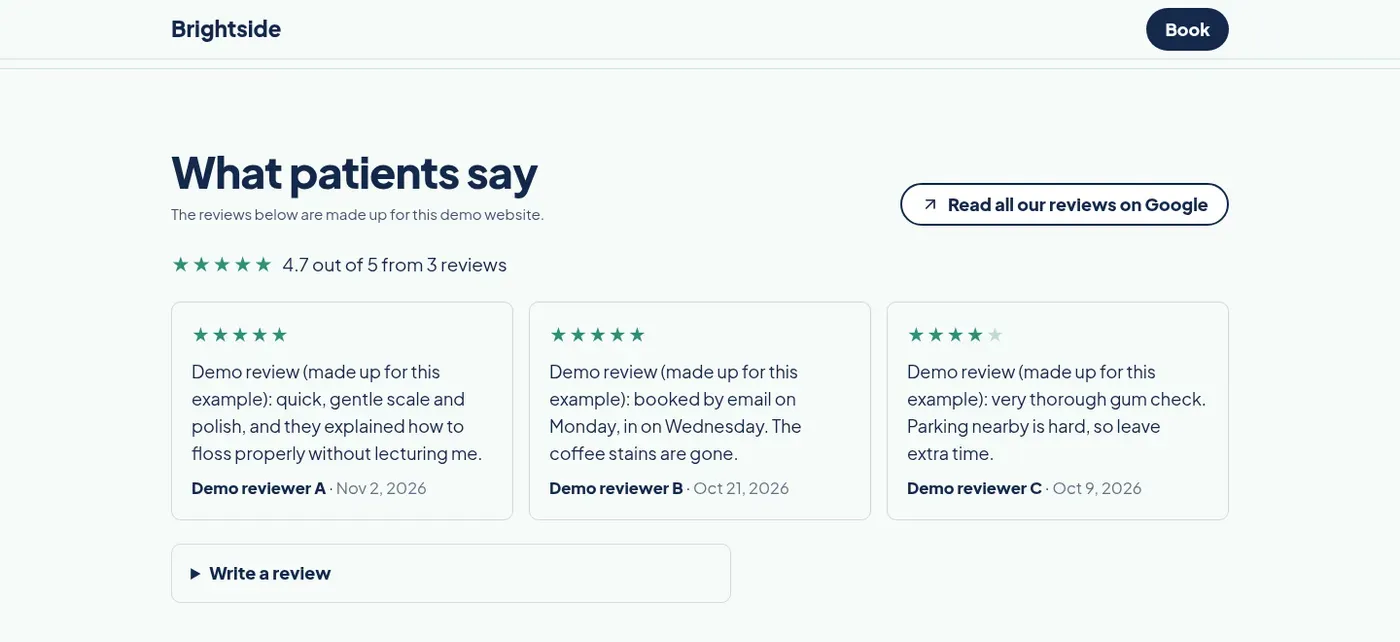
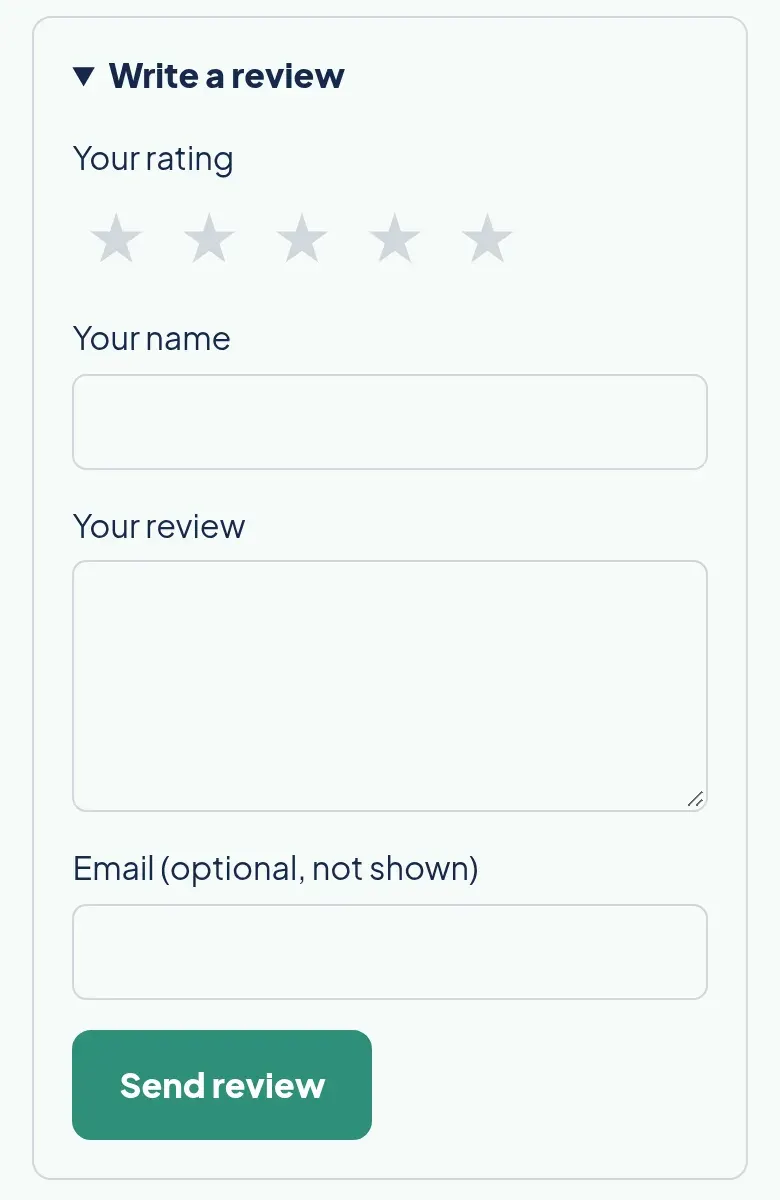
What Ginta doesn't do, so nobody is surprised:
- No automatic import from Google. You copy the reviews you have permission to use.
- No stars in Google search for your own reviews, for the reasons above, even though the markup is there.
- Widgets only on paid plans. Free websites can't load an outside widget script; paid plans from €5 a month can add any https script, and checking what it does is up to you.
On approval: it exists to stop spam and fake reviews, not to hide honest criticism. Approve genuine reviews, good or bad, and reply where you can.
Want to check how fast and well-built your current website is, widget and all? Try the free website checker.
Questions
Can I copy Google reviews to my website?
Google's guidance says reviews belong to the people who wrote them and you need each reviewer's consent to use theirs in your marketing; ask by replying to the review. Copy it word for word, say it's from Google, and add the date.
Why don't my review stars show in Google?
Because Google doesn't show star snippets for reviews a local business or organisation shows about itself, whether you copied them or used a widget. Your stars show on your Google Business Profile instead.
Is there a free Google reviews widget?
Several widget services have free tiers with limits. They load an outside script on your page, which can slow it and may need a cookie banner. A free alternative is a plain link to your reviews on Google.
Does a reviews widget need a cookie banner?
It depends on what the script does: if it sets cookies or sends visitors' data to the widget's company, you may need consent first. Check the widget's own documentation. A plain link needs no banner.
Can visitors leave reviews on my website?
On Ginta, yes, if you turn the review form on. Each review waits until you approve it, and only approved ones show.
Can I delete a bad review on my website?
You can on your own website, but think twice: in the UK, the competition authority warns that hiding genuine negative reviews can be misleading. Reply to it instead, and remove only fake or abusive ones. A review on Google itself you can't delete: you can reply, or report it if it breaks Google's policies (report a review).
Written with AI help for Ginta, which Povilas runs; he also teaches a website-building course. The screenshots are from the real Ginta on the date above, and prices come from our pricing page.