Switching from ChatGPT to Claude without starting your website again
When you switch from ChatGPT to Claude, a website that only exists inside ChatGPT doesn't come with you: you'd copy the code out and start a new conversation around it. If the website lives in a hosting account that both assistants can use, there's nothing to move. With Ginta, ChatGPT, Claude, Claude Code, Codex, Cursor and Ginta's own editor all change the same website, and every change is saved as a version with a short note about what changed.
We make Ginta. Anthropic's and OpenAI's features below were checked on their own pages on the dates given.
Why a website gets stuck in one chat
Ask an assistant for a website and, without any connection to a host, you get code in that conversation: a canvas in ChatGPT, an artifact in Claude. Some assistants can now host what they build themselves, such as ChatGPT Sites or a published Claude artifact. Either way, the website is tied to that app: its address, its history and the way you change it.
So switching assistants means one of three things: copy the code and paste it into the new chat, keep paying for the old app just to keep the site, or rebuild it. None of them is hard for a one-page site, and all of them get tiring the third time you change something.
Claude can import what ChatGPT remembers about you: Anthropic's help center describes pasting the text your previous AI exports into Settings → Your Claude → Start import, available on the web and Claude Desktop and labelled "experimental" (Import and export your memory, checked on 9 November 2026). That carries over context, not your website.
The fix: keep the website outside the chat
Ginta runs an MCP server at https://ginta.app/mcp, the standard way assistants use outside tools. Each assistant you
connect signs in to your Ginta account, so they all see the same websites:
- One home. The site is in Your websites, at
<name>.ginta.pageor your own domain, whichever assistant made it. - A note on every change. When an assistant creates or changes a site through Ginta, it has to add one or two plain sentences saying what changed and why. Ginta's editor shows them as grey lines, like "Changed by Claude: Made the headline say we walk every weekday", and the next assistant can read the list of versions with their notes.
- Undo across apps. Every change is a version. Restore one from ChatGPT, Claude or Ginta's editor (History), and the last 20 versions are kept.
- Nothing to export. Forms, messages, bookings, a shop or a menu stay where they are, because Ginta runs them, not the chat.

Connect each assistant (once)
Use the same Ginta account every time. In each app you add the address https://ginta.app/mcp, sign in to Ginta and
press Allow.
- ChatGPT (Plus, Pro, Business, Enterprise, Edu, on the web): turn on developer mode, then Plugins → + → Add custom MCP server, authentication OAuth. ChatGPT asks you before each change. Steps: Use Ginta in ChatGPT.
- Claude (claude.ai and the desktop app, free plan too): add Ginta from the connector directory, or as a custom connector. Steps: Use Ginta in Claude.
- Claude Code:
claude mcp add --transport http ginta https://ginta.app/mcp, then/mcp→ ginta → Authenticate. Steps: Use Ginta in Claude Code. - Codex or Cursor:
codex mcp add ginta --url https://ginta.app/mcp, or add the address to Cursor'smcp.json. Steps: Deploy from Codex or Cursor.
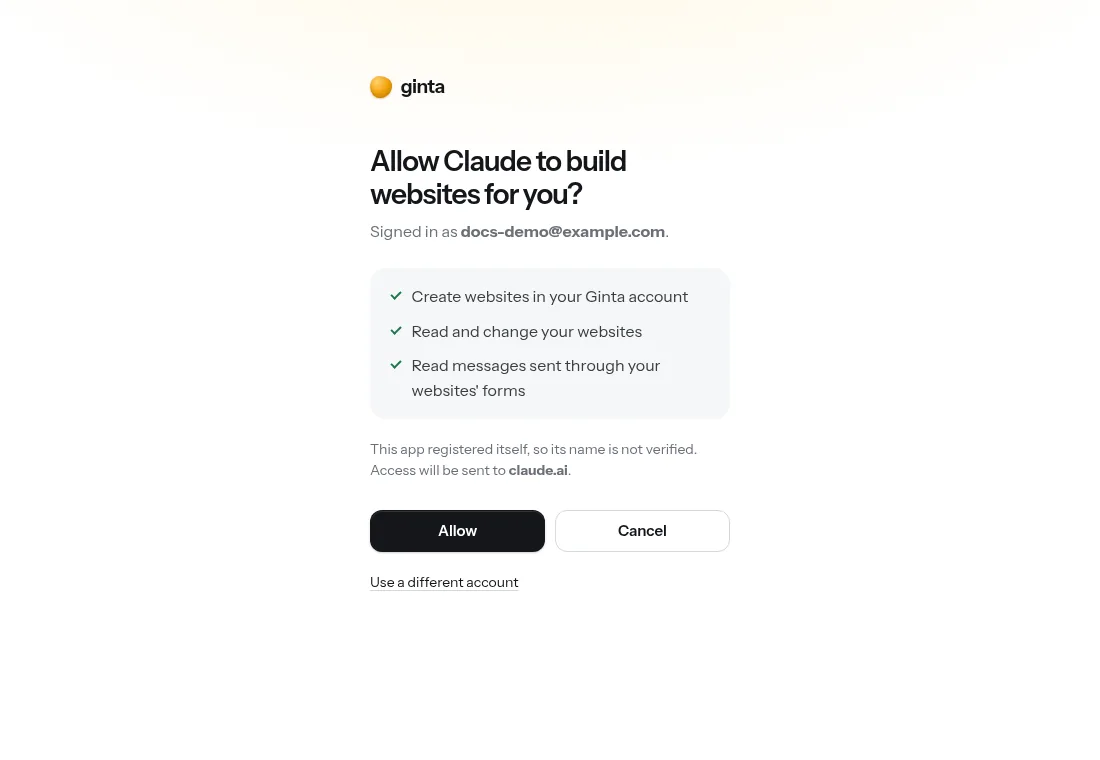
Then just ask, in the new app
In Claude, the first message can be as plain as:
Show my Ginta websites. On spoke-and-chain, read the recent changes, then add our new Sunday hours: 10–14.
Claude can list your sites, read the version notes ChatGPT left, make the change and leave its own note. Next week you can ask ChatGPT again, or open the site in Ginta's editor and type the change there; Ginta's own AI reads the latest notes from Claude or ChatGPT before it starts.
If your website isn't on Ginta yet
- It's code in an old ChatGPT chat or a Claude artifact: connect Ginta to the assistant you use now, paste the code into the chat and ask it to "publish this with Ginta as a new site". Images are better added through Ginta's photo drop link (ask for one) than pasted into the chat.
- It's a folder on your computer: from Claude Code, Codex or Cursor, ask it to "deploy this folder to Ginta"; it uploads everything as one .zip.
- It's an app with its own server code (logins, a database you wrote): Ginta hosts websites, its ready-made parts and your own JavaScript, not your server code, so that kind of app needs a developer host.
Where Ginta is weaker
- The chats themselves don't move. Ginta keeps the website, its versions and their notes; your old conversation stays in the old app.
- ChatGPT's free plan: developer mode is on paid ChatGPT plans; on Free you'd use Ginta's plugin from ChatGPT's plugin directory once it's approved.
- No server code of your own, as above. A website, a shop, bookings, forms: yes. A custom backend: no.
- Own domain is paid: at
<name>.ginta.pageon Free; your own domain on paid plans (from €5 a month).
What it costs
Building from your own assistant uses no Ginta credits. Ginta's Free plan has 20 websites with a small "Made with Ginta" badge; Hosting (€5 a month) adds 1 domain and removes the badge. All plans: pricing.
Questions
Can Claude edit a website I made with ChatGPT?
Yes, if the website is in your Ginta account: connect Ginta to Claude with the same Ginta account and ask. If it only exists inside ChatGPT, copy the code into Claude (or ask ChatGPT, with Ginta connected, to publish it to Ginta first).
Will Claude know what ChatGPT changed?
It can read the website's versions with their notes, and the files as they are now. It doesn't see your ChatGPT conversation.
Do I need a separate Ginta account for each assistant?
No. Sign in with the same Ginta account in every app: they all see the same websites.
Can I undo a change another assistant made?
Yes. Every change is a version: ask any connected assistant to restore an earlier one, or use History in Ginta's editor. A restore is a new version, so it can be undone too.
Written with AI help for Ginta, which Povilas runs; he also teaches a website-building course. The screenshots are from the real Ginta on the date above, and prices come from our pricing page.