How to add online booking to a website Claude or ChatGPT made
Claude or ChatGPT can write a good-looking booking page, but the page alone can't take bookings: something on a server has to know which times are free, save the booking, email you and the customer, and stop two people taking the same slot. You have three ways to add that: a booking app's link or widget, a backend you build yourself, or a host with booking built in. Below are all three, and a real example where Claude built a bike workshop's website and added working booking to it through Ginta's MCP server, without a single line of booking code.
Ginta is our product. The example is a demo website for a made-up business, built on 5 November 2026.
Why the AI's booking form doesn't work on its own
Ask an assistant for "a website with online booking" and you usually get a nice form with a date picker and a "Book" button. Put that page on any static host and the button goes nowhere, or it sends an email with a date the customer typed, whether you're free or not. A booking system needs:
- Your real free times: opening hours, breaks, days off, how long each service takes, how much notice you need.
- One booking per slot: when someone books 10:00, nobody else can.
- Emails both ways, ideally with a calendar file, and a link for the customer to change or cancel.
- A place where you see and manage bookings, on your phone.
- Optionally a deposit or payment, which needs a payment provider.
None of that can live in an HTML file. That's the gap between a page an AI writes and a business website.
Three ways to add booking
| Way | How it works | Good for | The catch |
|---|---|---|---|
| A booking app | Sign up for a booking service, then link its booking page or paste its widget code into your page | You already use one, or need features like group classes and packages | Another account and bill; the booking page often looks like the app, not your website |
| Build it yourself | Ask the AI to build a backend too: a database, an API, emails, a calendar check | Developers who want full control | Hosting, security, emails and bugs are now yours to run |
| A host with booking built in | Publish the page on a host that has booking as a ready-made part, and the AI drops it in | Small businesses that want it to just work | You use the host's booking features, not anything you can imagine |
If you already pay for a booking app you like, the first way is fine: ask the assistant to add its link to the "Book" button, and check the widget is allowed on your host. The rest of this post is the third way, because it's the one an assistant can set up for you end to end.
A real example: Claude adds booking to a bike workshop's website
The business: Kelvin Cycle Works, a (made-up) bike repair workshop in Glasgow. Claude, connected to Ginta through the MCP server, did this in one conversation:
- Wrote the website as its own HTML and CSS: a big headline, a "How a repair works" section, the address and
hours, a contact form, a privacy page. Where the booking goes, it put one empty placeholder,
<div data-ginta-module="bookings"></div>, instead of a form. - Published it with
create_site: live at kelvin-cycle-works.ginta.page. Ginta's check answered straight away that the page talks about booking online but the booking part is still empty. That's the safety net: a page doesn't get to promise what the website can't do. - Set up booking with one
manage_modulecall: three services (a safety check, 30 minutes, £25; a full service, 90 minutes, £75; a puncture repair, 30 minutes, £15), the opening hours (Tuesday to Friday 8–6, Saturday 9–4), the time zone, two hours' notice, 30 days ahead, and one question of the owner's own on the form: the type of bike. - Looked at the live page with
preview_siteon a computer and a phone, and fixed one alignment detail.
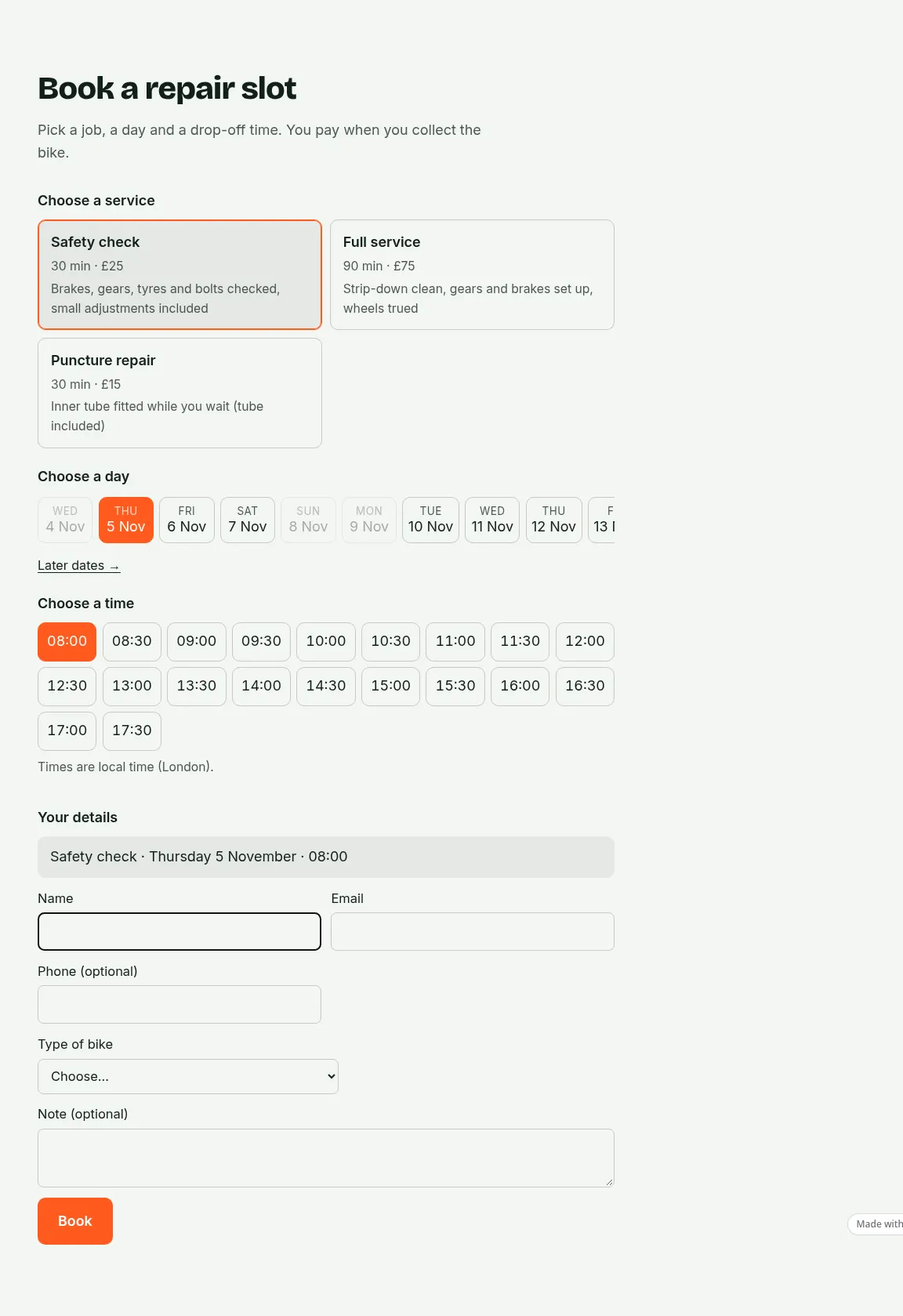
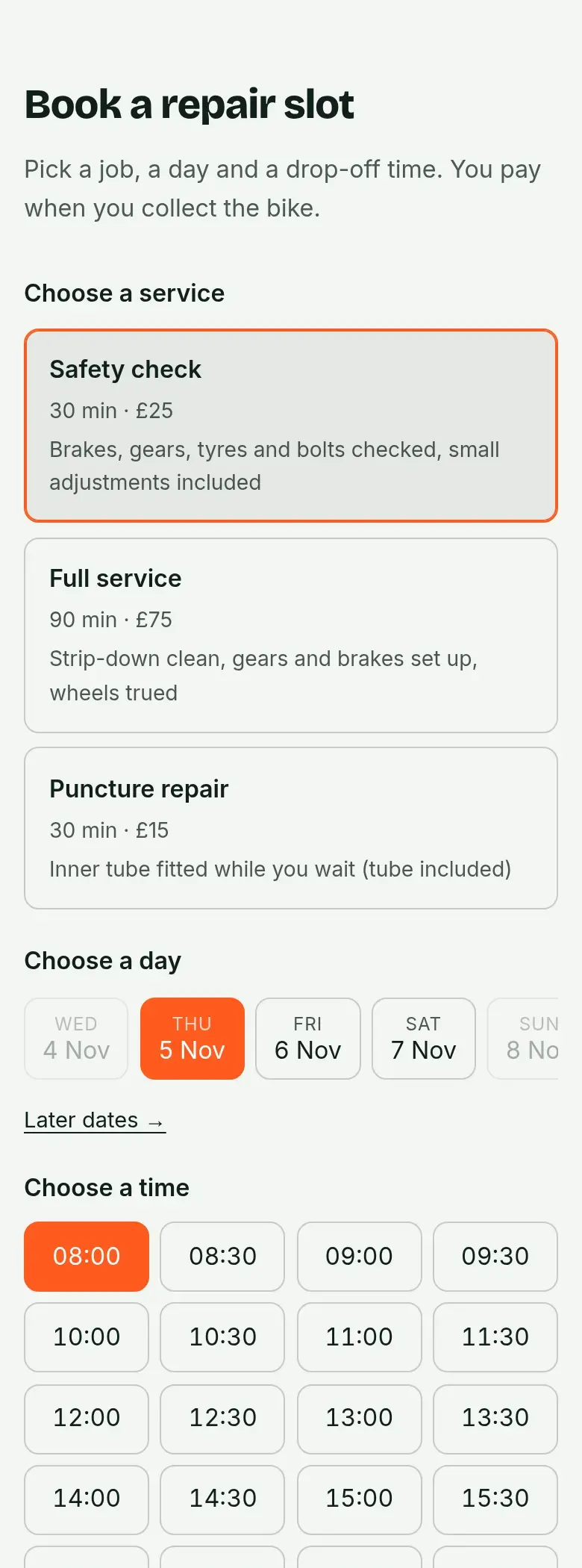
The visitor picks a service, a day and a time, fills in their details and presses Book. They get an email with a calendar file and a link to change or cancel; the owner gets the booking by email and in Ginta, where the calendar, services, hours and days off live. Nobody wrote booking code: the placeholder is filled in by Ginta every time the page is opened, with the times that are free right then.
What you can ask for next
Booking is one of Ginta's ready-made parts. Once the website is on Ginta, the same assistant can change it in plain words, and so can you in Ginta's own chat:
- A deposit or full payment online, through your own Stripe account (connected once in Ginta). The money goes straight to you; Ginta takes no fee. More in how to take deposits for appointments.
- Staff: who does which service, and each person's days off.
- Home visits: the form asks for the customer's address and leaves travel time between visits.
- Your own questions on the form (car make and year, dog size, the type of bike).
- Booking in your own look: if you want your own steps, cards or calendar, the assistant can draw the booking flow
itself with Ginta's booking helper, while Ginta still decides every free time, price and email. Developers: the
data-headlessnotes in Ginta's MCP guide. - Every booking to another app: Ginta can send each new booking to Zapier or Make, from the website's Settings → General.
What it costs
Building through Claude or ChatGPT uses no Ginta credits: the AI work is your assistant's, on your Claude or ChatGPT plan. Booking is on every Ginta plan. On the free plan a website takes up to 30 bookings a month (then the days say "Fully booked, please contact us"); paid plans have no monthly booking cap. Your own domain starts at €5 a month on Hosting, the plan for people who build with their own AI. Stripe charges its usual card fees when you take payments.
What it can't do (yet)
Be clear about these before you promise them on your page:
- Several people in one slot (a class of 12, a table for 4): that's Ginta's Events & classes part, or a booking request form for restaurant tables.
- Nights or date ranges (holiday lets, rooms): Ginta's booking sells times, not nights.
- Syncing with Google Calendar: bookings come with calendar files, but Ginta doesn't read your other calendars.
Questions
Can ChatGPT or Claude add a working booking system by itself?
It can write the page and the form, but a working booking system needs a server for free times, saved bookings and emails. Either it connects a booking app you already use, you build and run a backend, or it publishes on a host that has booking built in, as in the example above.
Do I need to know how to code?
No. You describe what you offer, how long each thing takes and when you work, and the assistant sets it up. You change services, prices and hours later in Ginta, or by asking the assistant.
Can I keep my website's design?
Yes. The booking part follows the page's fonts and colours, and the assistant can restyle it or draw its own booking flow in your design.
Is it free?
On Ginta's free plan, yes: the website stays online at a ginta.page address with up to 30 bookings a month. You need a paid plan for your own domain.
Written with AI help for Ginta, which Povilas runs; he also teaches a website-building course. The screenshots are from the real Ginta on the date above, and prices come from our pricing page.