From a Claude artifact to a real website on your own domain
A Claude artifact's Publish button gives you a public link on Claude's address, not a website on your own domain. To turn an artifact into a real website, either copy its code to a host that takes your domain, or connect Ginta to Claude so Claude publishes the page itself, at its own address straight away and on your domain once you connect it. Below: what Claude's publishing does and doesn't do, both ways, and a real run where Claude wrote a page as one HTML file and published it through Ginta in 151 seconds.
Claude's features were checked in Anthropic's help centre on 29 October 2026. Ginta is our product.
What "Publish" on an artifact does
In Claude's apps (Free, Pro and Max), an artifact's Publish button makes a public link: "anyone with the link can view and use it without a Claude account". You can also get embed code and choose which websites may embed it. If you unpublish it, the link stops working and you can't publish that artifact again (Publish and share artifacts).
What it isn't: Anthropic's article doesn't offer a custom domain, and a published artifact lives inside Claude's site, not as your business's website. For a demo or a tool you share with friends, that's fine. For a business, you want your own address, search engines finding it, a contact form that emails you, and someone able to change it next month.
Two ways to turn an artifact into a website
1. Copy the code to a host. Ask Claude for the artifact as one self-contained HTML file, copy it, and drop it on a static host such as Netlify Drop or GitHub Pages; both let you connect your own domain. Good if you're comfortable with files, DNS and changing the code yourself later. Our longer guide: how to publish a website you made with ChatGPT or Claude.
2. Let Claude publish it, with Ginta connected. Add Ginta to Claude once as a connector: it's in
Claude's connector directory, or add it as a custom connector with the address
https://ginta.app/mcp (steps on build a website with Claude). Then, in the chat where Claude made the artifact, say
"publish this with Ginta". Claude sends the page to Ginta, which puts it online at name.ginta.page and keeps it in
your Ginta account, where you (or Claude, later) can change it. Contact forms send you the messages, and Ginta adds a
privacy page when the site has a form, a sitemap, and the speed work.
A real run: Claude writes the page, then publishes it
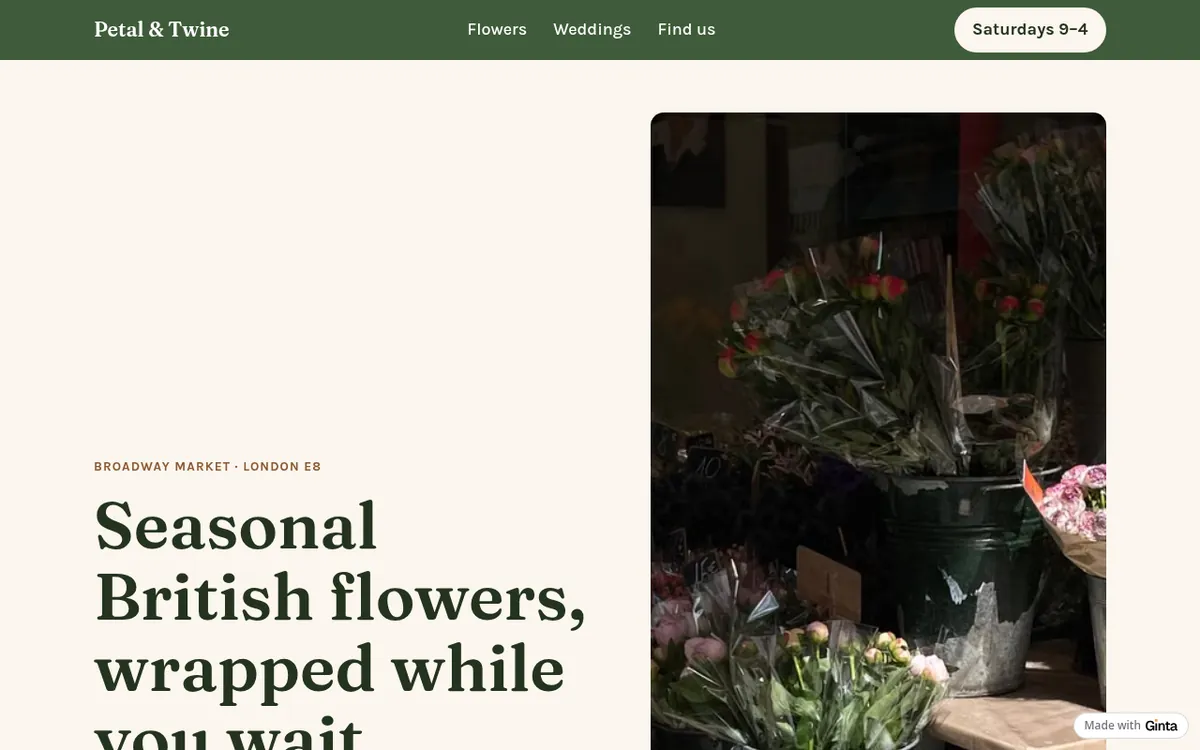
I asked Claude (Claude Opus 5.5 through the Claude API, with Ginta's MCP server connected, the same server you add in claude.ai) to do both steps in one go: write a page for a flower stall as one self-contained HTML file, "the way you'd make an artifact here in the chat", then publish exactly that page with Ginta and tell me how to put it on my own domain. The business is made up; the run, its time and the website are real, from 29 October 2026.
What Claude did, in order:
- Wrote the page as one HTML file in its reply (fonts, layout, icons and photos in that one file).
- Called Ginta's
get_guide, thencheck_nameto see if the address was free. - Called
create_sitewith the page: live at petal-and-twine.ginta.page. - Called
preview_siteto look at the live page on a phone and a computer. - Called
connect_domainfor petalandtwine.co.uk, which Ginta refused, because this account is on the Free plan and your own domain needs a paid one.
151 seconds from the request to the live website. Building through Claude uses no Ginta credits: the AI work is Claude's, on your Claude plan.

Putting it on your own domain
The step Claude couldn't finish on Free takes a paid plan: Hosting at €5 a month is made for people who build with their own Claude or ChatGPT (your own domain, no badge, no Ginta credits needed), or Light at €19 if you also want Ginta's own AI. Then either ask Claude again ("connect petalandtwine.co.uk") or open the website's Settings → Address & domain in Ginta. Ginta shows the exact DNS records for your registrar and checks them until the domain works: how to connect your own domain. No domain yet? Find your domain in the same place buys one in your name for €29 a year and connects it for you.
Questions
Can I use my own domain for a Claude artifact?
Not with Claude's Publish link: Anthropic's help article offers a public link and embedding, not a custom domain. Put the artifact's code on a host that takes your domain, or have Claude publish it through Ginta and connect your domain there.
Does Claude need a paid plan to publish through Ginta?
Ginta works as a connector on Claude's free plan too; the current steps are on
build a website with Claude. On Ginta's side the free plan publishes at a name.ginta.page
address, and your own domain starts at €5 a month.
Will the website stay up if I delete the chat?
Yes. The website lives in your Ginta account, not in the chat. A published artifact link, by contrast, stops working if you unpublish it.
Can I change the website later without Claude?
Yes: in Ginta's editor you can click any text to change it, ask Ginta's own AI, or edit the code. Or ask Claude again in any chat with Ginta connected.
Is a Claude-made page good enough for a business?
It can be, if you check it like a customer would: your real prices, hours and contact details, readable on a phone,
and a way to get in touch. Claude can look at the live page on a phone and a computer with Ginta's preview_site,
and fix what it sees.
Written with AI help for Ginta, which Povilas runs; he also teaches a website-building course. The screenshots are from the real Ginta on the date above, and prices come from our pricing page.