How to sell tickets for a workshop or class without Eventbrite's fees
On Eventbrite a paid ticket carries a service fee (on its pricing page: 3.7% + $1.79 per ticket) plus a 2.9% payment processing fee per order, paid by the buyer unless you choose to absorb it. For small classes and workshops you can sell places on your own website instead and pay only the card processor's fee: with Ginta's Events part the money goes into your own Stripe account, Ginta takes 0%, and a full class gets a waiting list. Free events cost nothing on Eventbrite either.
This is for yoga teachers, potters, cooking classes, tour guides and small venues selling a few dozen places at a time. For concerts and festivals with thousands of tickets, Eventbrite and similar ticketing companies do things a website can't (see the end). Eventbrite's numbers come from its own pricing page, checked on 20 November 2026; Ginta is our product.
What Eventbrite charges
From Eventbrite's pricing page, as it showed to us:
| Eventbrite | |
|---|---|
| Free events | No fees |
| Service fee on a paid ticket | 3.7% + $1.79 per ticket |
| Payment processing | 2.9% per order |
| Who pays the fees | The buyer, by default; you can choose to absorb them |
| Where these plans apply | United States, Canada, Australia, New Zealand, the United Kingdom and Ireland |
The fixed part ($1.79) is shown in US dollars there; it differs by country, so open the page from yours. Eventbrite's paid Pro plan, which it says helps you reach more people, is extra.
A worked example: 12 places at 35
A weekly wheel class with 12 places at $35 each, one place per order:
- Eventbrite: service fee 3.7% of $35 + $1.79 = $3.09 a ticket, plus 2.9% processing, about $1 more. That's about $4.10 a ticket, roughly 12% of the price, or about $49 for the 12 places. By default the buyer pays it on top, so each place costs them about $39.
- Your own website with Stripe, in the UK: Stripe's fee on a standard UK card is 1.5% + 20p (Stripe UK pricing). On a £35 place that's 73p, about 2% of the price, or £8.70 for 12 places. In the eurozone it's 1.5% + €0.25 on standard EEA cards (Stripe pricing, Ireland). Ginta adds nothing on top.
The percentages are what matter: about 12% against about 2%. On a whole term of weekly classes, the difference pays for your website many times over.
Free ways to take sign-ups
- A plain sign-up form, pay at the door. No fees at all, but no place count: you count by hand, and people who sign up and don't come cost you nothing but cost you a place.
- A payment link from Stripe or your bank. Only the card fee, but it doesn't know how many places are left, so you stop it by hand when the class is full.
- An events list on your own website that counts places, takes payment and keeps a waiting list. That's what Ginta's Events part does, below.
What a small event really needs
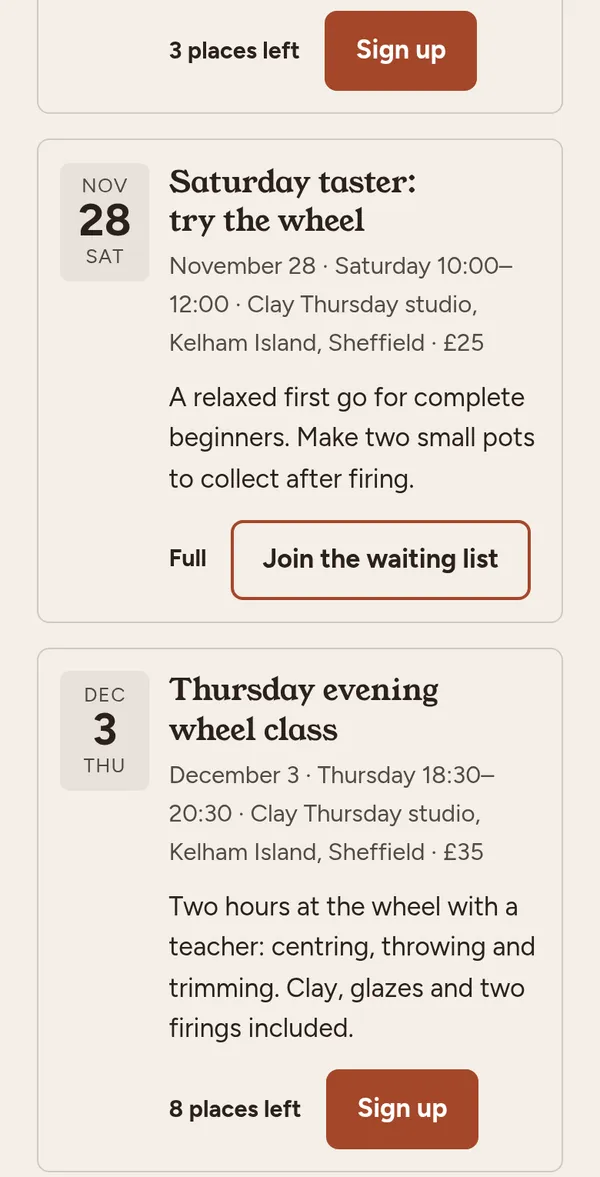
- How many places are left, on the page ("3 places left"), and "Full" when it is.
- A waiting list, so a cancellation isn't an empty wheel.
- A confirmation with a calendar file, and a reminder the day before.
- A link to cancel, so people tell you instead of just not coming.
- A list of names for the evening, and the buyers' emails, which stay yours.
How Ginta's Events works
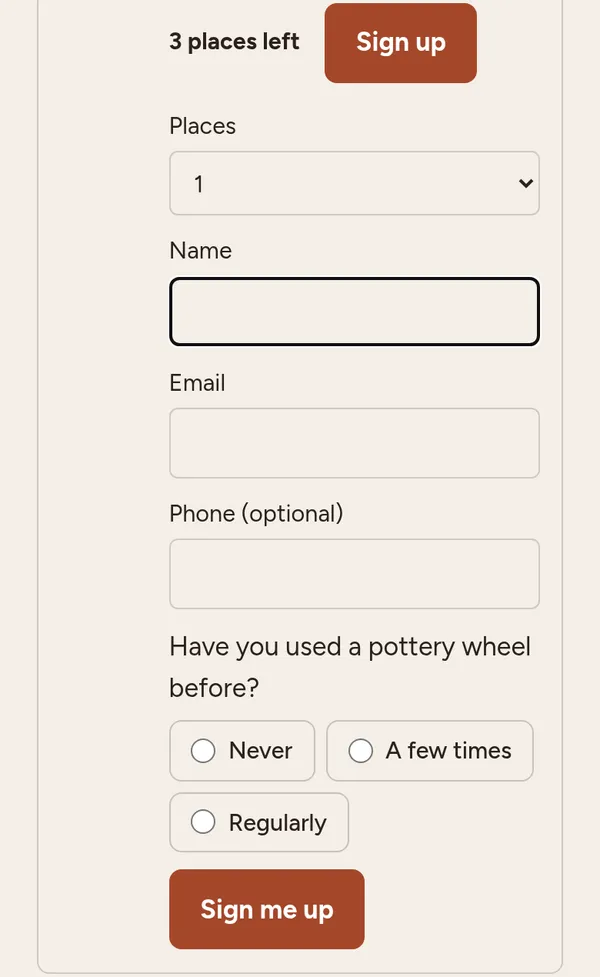
We built a demo pottery studio for this post, Clay Thursday in Sheffield: a Thursday evening wheel class (8 places, £35, every week) and a Saturday taster (6 places, £25) that's already full. It's at clay-thursday.ginta.page. The studio is made up; the events and places are real Ginta Events.

What it does:
- Events once or weekly ("every Thursday for 6 weeks" is one line), with date, time, place, number of places and a price, or free.
- Places left and a waiting list. For a free event, a freed place goes to the next people on the waiting list by themselves; for a paid one, the people waiting get an email that a place is open, so they can pay for it.
- Your own questions on the sign-up form (level, sizes, dietary needs), up to six.
- Emails: a confirmation with a calendar file, a reminder the day before, and a cancel link.
- Paid places once your own Stripe account is connected in the website's Settings → Payments: people pay when they sign up, the money goes to your Stripe, and you can refund a sign-up from Ginta. Until Stripe is connected, the price is shown and people sign up without paying online, which is how the demo works.
- Who's coming: the list of sign-ups per event in Ginta, with "Download list" as a spreadsheet file.
- Google: each event carries Event data that search engines read.
When Eventbrite is still the better choice
- Discovery. Eventbrite is a place where people search for things to do; your own website brings no new people by itself.
- Big events and door scanning. Ginta's places come with a confirmation email and calendar file, not QR-code tickets, and there's no app to scan people in at the door.
- Passes and packs. Ginta sells one price per place: no 10-class cards, memberships, member prices or discount codes for events.
- Several ticket types for one event (early bird, VIP, child): on Ginta that means separate events.
Many organisers use both: Eventbrite for one big event a year, their own website for the weekly classes.
What it costs
Events are on every plan, Free too: up to 5 upcoming events per website, so a weekly class on Free shows
its next 5 dates, and you add more as they pass. Paid places through your own Stripe work on Free. Free
websites live at a name.ginta.page address with a small "Made with Ginta" badge. Paid plans show up to
300 upcoming events, add your own domain, and start at €5 a month if you build with your own
Claude or ChatGPT, or €19 a month on Light, with 150 credits a month for changes by Ginta's
AI. Ginta takes 0% of ticket money on every plan. See pricing.
For a single business type in more detail, see our supper club example, with a menu and paid seats. For appointments with one client at a time, it's Bookings instead: what booking apps charge.
Questions
Is Eventbrite free?
For free events, yes: Eventbrite's pricing page says there are no fees for free events. Paid tickets carry a service fee and a payment processing fee.
Who pays Eventbrite's fees, me or the buyer?
The buyer, by default. When you set up a ticket type you can choose to absorb the fees yourself.
How do I sell class passes or 10-class cards?
Not with Ginta's Events: it sells one price per place. Sell a pass as a product in Ginta's Shop and sign pass holders up yourself, or use a studio booking app that has passes.
Can people join a waiting list?
Yes. When an event is full, the sign-up button becomes "Join the waiting list". Free events move people up by themselves when a place is freed; for paid events, the people waiting are emailed that a place is open.
Do people get a ticket with a QR code?
No. They get a confirmation email with the event's details and a calendar file. For a class of 8 or a workshop of 20, the list of names from Ginta does the same job at the door.
Can I take payment at the door instead?
Yes. Leave Stripe unconnected (or the price at 0 and write the price in the description): people sign up online and pay you on the day.
Written with AI help for Ginta, which Povilas runs; he also teaches a website-building course. The screenshots are from the real Ginta on the date above, and prices come from our pricing page.