How to add online booking to your website: 3 ways, and what each costs
There are three ways to take bookings online: send people to a booking app's page, paste a booking widget into the website you already have, or use a website with booking built in. For a one-person business the simplest is the third, because clients book where they already look (your website) and there's one thing to keep up to date. Below: what each way costs, what to set up whichever you pick, and a real piano teacher's website with booking, built from one message in 69 seconds on Ginta's free plan.
Prices for other tools were checked on their own pages on 29 October 2026 and are linked. Ginta is our product.
The three ways, side by side
| How clients book | What it costs to start | Good for | |
|---|---|---|---|
| 1. A booking app's own page (Calendly, Square Appointments, Google Calendar) | A link in your Instagram bio, Google profile or emails opens the app's page | Free plans exist; payments and reminders often need a paid plan | Testing whether people book online at all |
| 2. A widget on your website (the same apps, embedded) | Your website shows the app's calendar inside a page | The website's cost plus the app's | You already have a website you like |
| 3. Booking built into the website (Ginta, Wix, Squarespace) | Clients book on your website; times, emails and payments come from the same place | Ginta: free, up to 30 bookings a month; Wix and Squarespace: a paid plan to take bookings | You don't have a website yet, or yours is out of date |
What the free plans of the usual booking apps leave out, in their own words:
- Calendly (pricing): the free plan has one event type; taking payment through Stripe or PayPal and automatic reminders are on paid plans.
- Square Appointments (UK pricing): a free plan with online booking and prepayment for chosen services; a cancellation policy and no-show fees are on Plus (£29 a month per location). Online card payments are 1.4% + 25p for UK cards on every plan.
- Google Calendar (premium features): a personal account can create one booking page; more schedules, automatic email reminders and payments need a paid Google plan.
- Wix Bookings: free to add, but Wix says you must upgrade to accept bookings. Details, checked on Wix's pages: Is Wix Bookings free?
What to decide before you switch booking on
Whatever tool you choose, these answers make online booking work instead of creating messages:
- Your services with a length and a price. "Lesson" isn't bookable; "45-minute lesson, £30" is. Separate services for things that take different times.
- When people can book. Your working hours with breaks, days off, and the gap you need between appointments (travel time if you go to the client).
- How much notice. The shortest time before an appointment that someone may book (two hours is a common default), and how far ahead (60 days is plenty for most).
- Cancelling and moving. Until when clients can cancel or move online themselves. Say it on the page.
- Paying. Pay on the day, a deposit, or the full price online. A deposit is what stops no-shows: how to take deposits for appointments.
- What you need to know. Name, email and phone are standard. Ask for more only if you need it (the visit's address for mobile work, the child's age for lessons), and keep health details for the appointment itself.
A real example: a piano teacher in Cardiff
Pontcanna Piano is made up for this post. The website, timings and credits are real, from 29 October 2026: pontcanna-piano.ginta.page.
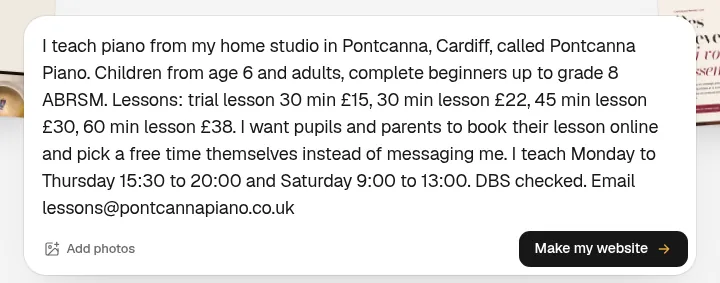
What I typed
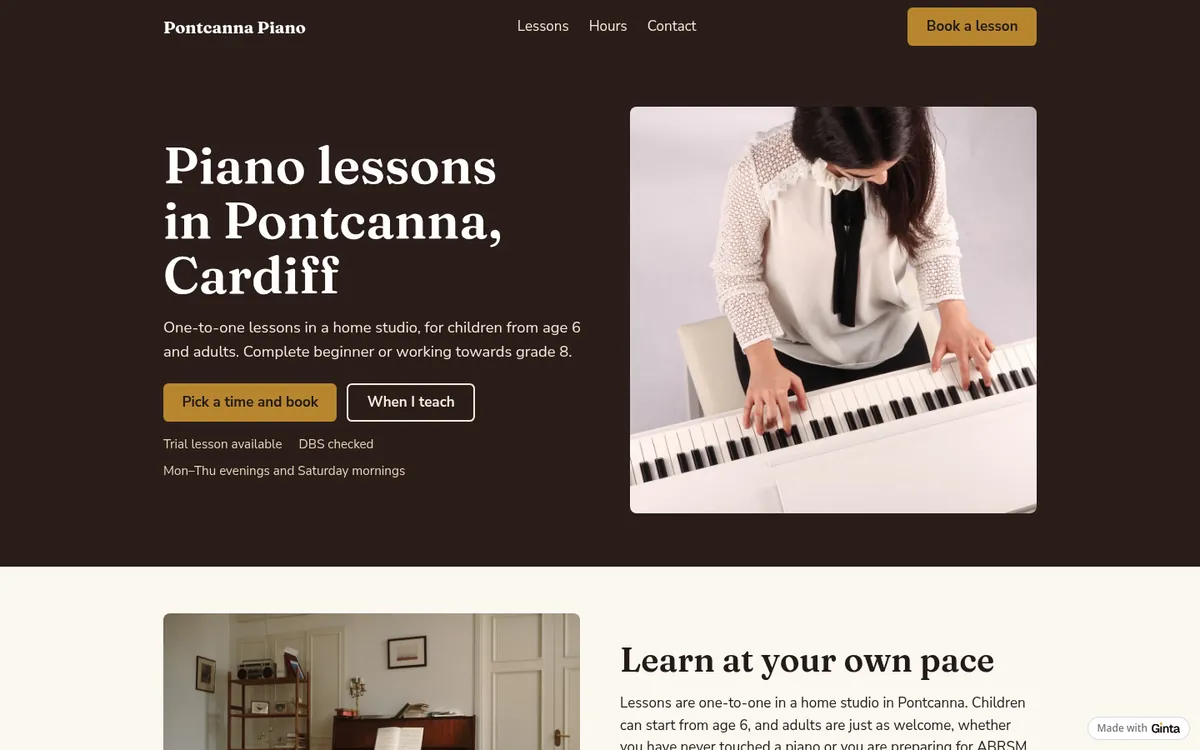
What came out, 69 seconds later
The website was live 69 seconds after I pressed the button and used 15.1 credits: 11.6 for the build and 3.5 for one repair round after Ginta checked the page like a visitor would. It asked no questions, because the message had what booking needs.
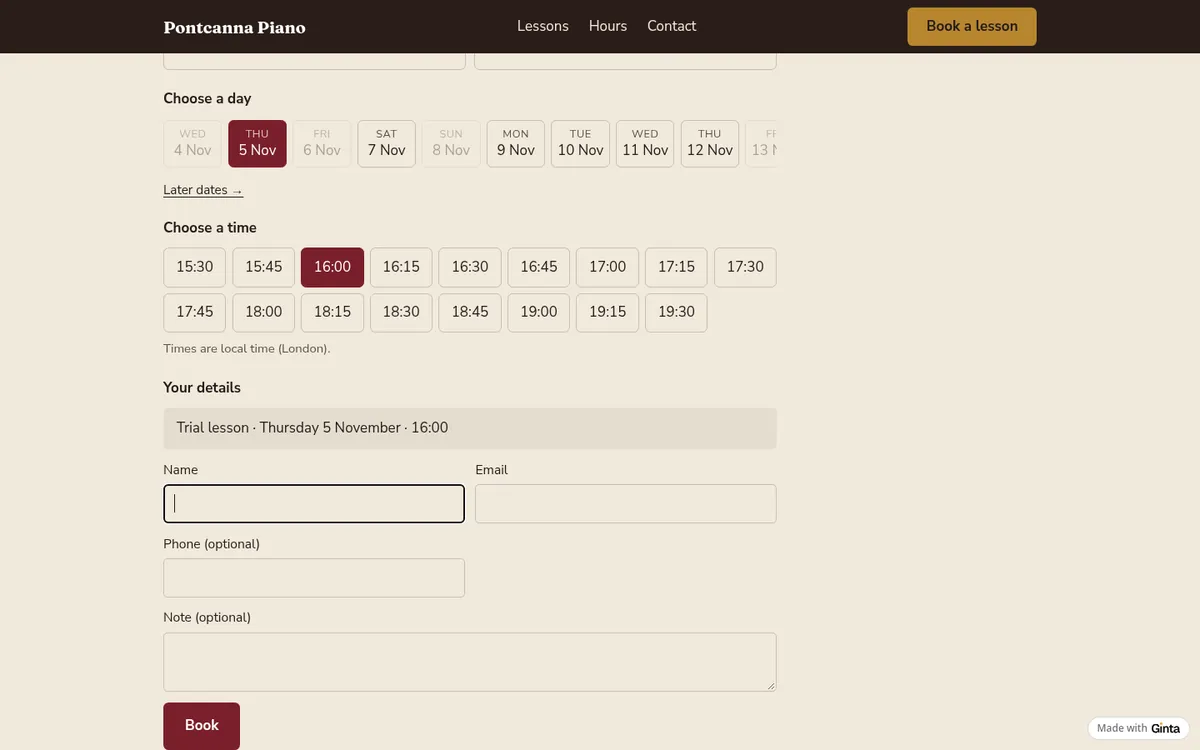
How a parent books
They pick a lesson, a day and a free time, and give a name, an email and, if they like, a phone number and a note. The times shown are the free ones only: inside the teaching hours, not clashing with another booking, at least two hours ahead. Both sides get an email with a calendar file, the client gets a reminder the day before, and the email has a link to move or cancel.
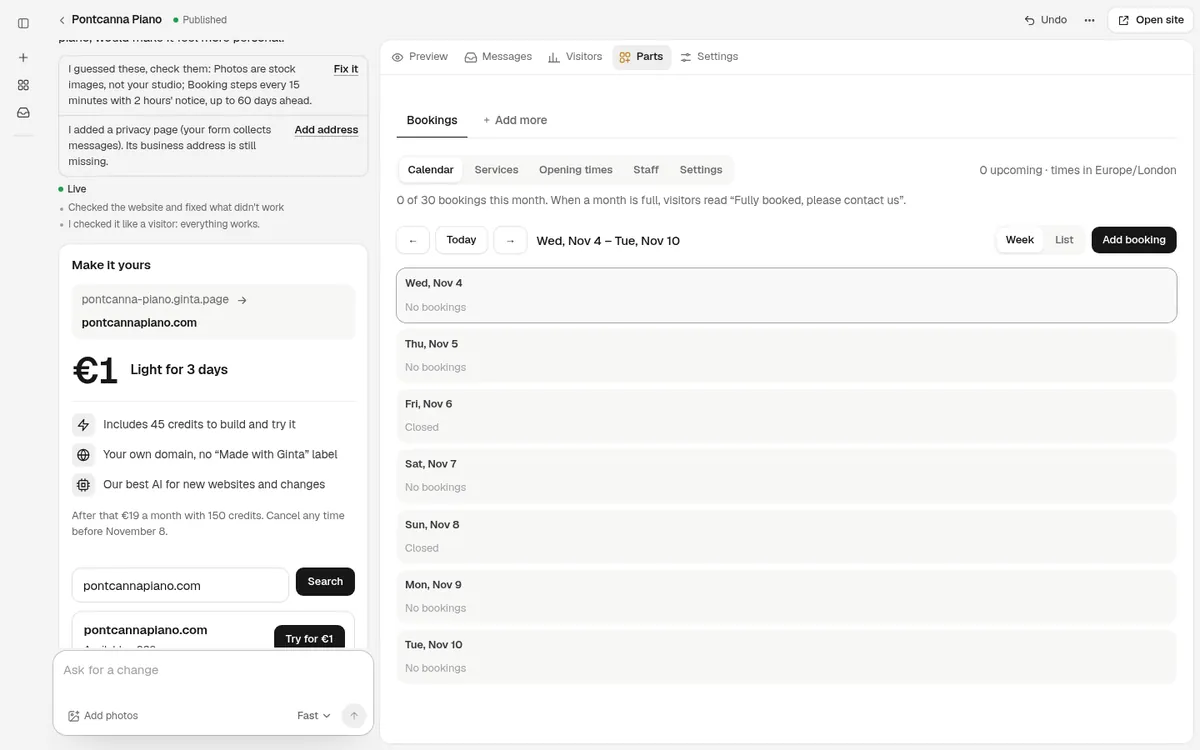
What the teacher manages
Bookings arrive in the website's Parts tab: a calendar of the week, the services, the opening times, staff and settings, all changed without the AI. The line under the calendar counts the month on the free plan: "0 of 30 bookings this month".
What I'd check before sharing it
- The guesses. Ginta listed what it decided for me: start times every 15 minutes, two hours' notice, up to 60 days ahead. All three are in Settings if they don't suit you.
- The photos. They're stock photos until you add your own; for a teacher, a photo of your own piano and room does more than anything else on the page.
- The privacy page. Ginta added one because the site takes bookings, and asked for a business address to put on it.
What it costs on Ginta
This build used 15.1 credits; every new account gets 25 free credits when it confirms its email, plus
5 a day. Bookings are on every plan; on Free, up to 30 bookings a month per website, at a
name.ginta.page address with a small "Made with Ginta" badge. When a month is full, its days say "Fully booked,
please contact us". Your own domain and no booking cap start at €5 a month (if you build with your
own Claude or ChatGPT) or €19 on Light with 150 AI credits a month. Deposits and full
payment go through your own Stripe account on any plan; Ginta adds no fee. See pricing.
When a booking app is the better choice: you already have a website you're happy with and only need a calendar inside it, or you need things Ginta's Bookings doesn't do, such as class packs that clients use up, memberships, or syncing with Google Calendar. (Ginta can send each new booking to Zapier or Make, from the website's Settings → General → "Send new entries to another app", and pass it on to a spreadsheet or another app from there.)
Booking for your kind of business
- Massage therapists: treatments, a deposit, what to wear and bring.
- Dog walkers: walks booked with the address, travel time between them.
- Driving instructors: lessons with pick-up, and the Free plan's monthly limit.
- Hair salons, nail salons, barbers and personal trainers.
- Classes and workshops with places rather than appointments: supper club example and yoga studios.
Questions
Can I take bookings online for free?
Yes. Ginta's free plan includes online booking with confirmations, reminders and online cancelling, up to 30 bookings a month per website. Calendly's and Google Calendar's free plans give you a booking page; their payments and reminders need a paid plan.
Can clients pay when they book?
Yes, once you connect your own Stripe account in Ginta: a deposit or the full price, paid when they book. The money goes to your Stripe account; Stripe charges its card fees and Ginta takes nothing.
Do my clients need an account to book?
No. They give their name and email (and a phone number if you ask for it); the confirmation email has their own link to move or cancel.
Can I stop people booking at the last minute?
Yes. Set the notice time (two hours by default) and how far ahead people can book; you can also block days off, such as holidays.
Can several people take bookings on one website?
Yes. Add your staff and the services each one does; clients pick a person or the first free time.
Written with AI help for Ginta, which Povilas runs; he also teaches a website-building course. The screenshots are from the real Ginta on the date above, and prices come from our pricing page.