What to write to an AI website builder: a prompt that works, from 123 real websites
The prompt that gets a good small-business website is short and factual: what you sell, where, to whom, your real prices and opening hours, the one thing visitors should do (call, book, order), and your own photos. In 123 real websites people built with Ginta, the owner's own photos and real details mattered more than any design words, and prompts that gave only a business name produced pages a visitor couldn't place. Below: a prompt to copy, what the 123 websites showed, and what to leave out.
The short answer: a prompt to copy
Fill in the brackets, delete what doesn't apply, and paste it into Ginta, ChatGPT or Claude:
[Business name] is a [what you are] in [town or area].
Customers: [who comes to you, and for what].
What we offer, with prices: [service or product – price], [another – price], [another – price].
Opening hours: [days and times], or "by appointment".
The one thing visitors should do: [call / book / order / visit] at [phone, email or address].
What's true and special about us: [one or two real facts: how long, a speciality, how you work].
Photos: I'll add my own. [Or: show photos of …]
Tone: [plain and friendly / calm and expert / …]. Language: [English].
Don't invent anything I haven't written, and tell me what you assumed.
That's about 80 words once filled in. Every line is a fact only you know. An AI can write good sentences and pick colours by itself; it can't know your prices, your hours or your phone number, and when it doesn't know, it guesses.
What 123 real websites showed
In November 2026 we looked at every real website people had made in Ginta: 123 of them, by 112 accounts (test, demo and our own accounts left out). Nine AI reviewer agents scored the 121 public ones from 1 to 10, blind, from screenshots at phone and computer width, the owner's first request with names removed, and a written rubric. It's our own data, the reviewers were AI, and some groups are small, so read the numbers as strong hints, not science. The average was 5.7 of 10. What stood out:
| What the website had | Websites | Average score |
|---|---|---|
| The owner's own photos | 22 | 7.0 |
| Stock photos | 54 | 5.5 |
| No photos | 17 | 5.4 |
| Photos that looked AI-made | 8 | 5.1 |
- Photos decided the most points. The owner's own photos beat everything else by a wide margin. Not design wording, not the choice of colours.
- Missing basics hurt. 18 websites had no way to call or find the business: no phone, no address, no hours. Usually the owner hadn't written them, and nothing else could fill them in honestly.
- Shops and booking pages with nothing in them were the biggest single problem, about 28 websites: the owner asked for a shop but never said what they sell or for how much.
- A name alone isn't a brief. Prompts that were only the business's name gave pages where a visitor couldn't tell what the business does.
- Long briefs written for developers turned up about 15 times: "full stack team", "build the admin panel", "database". They didn't help. The owners who wrote one or two honest sentences about the business first did better.
- People who used their own Claude or ChatGPT through Ginta scored 6.3 on average (23 websites), against 5.5 for Ginta's own builder (98). The biggest gap was in content (6.0 against 5.2): they kept working on the website and often brought their own words and photos.
The same business, two prompts
To show the difference in one picture, we built a demo plumber twice, once from a one-line request ("Website for Kowalski Plumbing") and once from the filled-in prompt below. Claude wrote both pages, the way an AI writes from each prompt, and published them through Ginta with the same design, so only the words differ. This is an illustration; the measurement is the table above.
Kowalski Plumbing is a one-man plumber, Jan Kowalski, in Leicester and villages within 15 miles.
Customers: homeowners and landlords with leaks, dripping taps, running toilets and blocked drains, and people planning a new bathroom.
Prices: call-out £65 including the first hour, then £40 an hour; blocked drains from £65; bathroom fitting by quote after a visit. No gas or boilers.
Hours: Monday to Friday 8:00–18:00, Saturdays emergencies only.
Main action: call 01632 960123. Bigger jobs can send a quote request with their postcode.
Tone: plain and friendly, written as "I". Don't invent reviews or years in business.
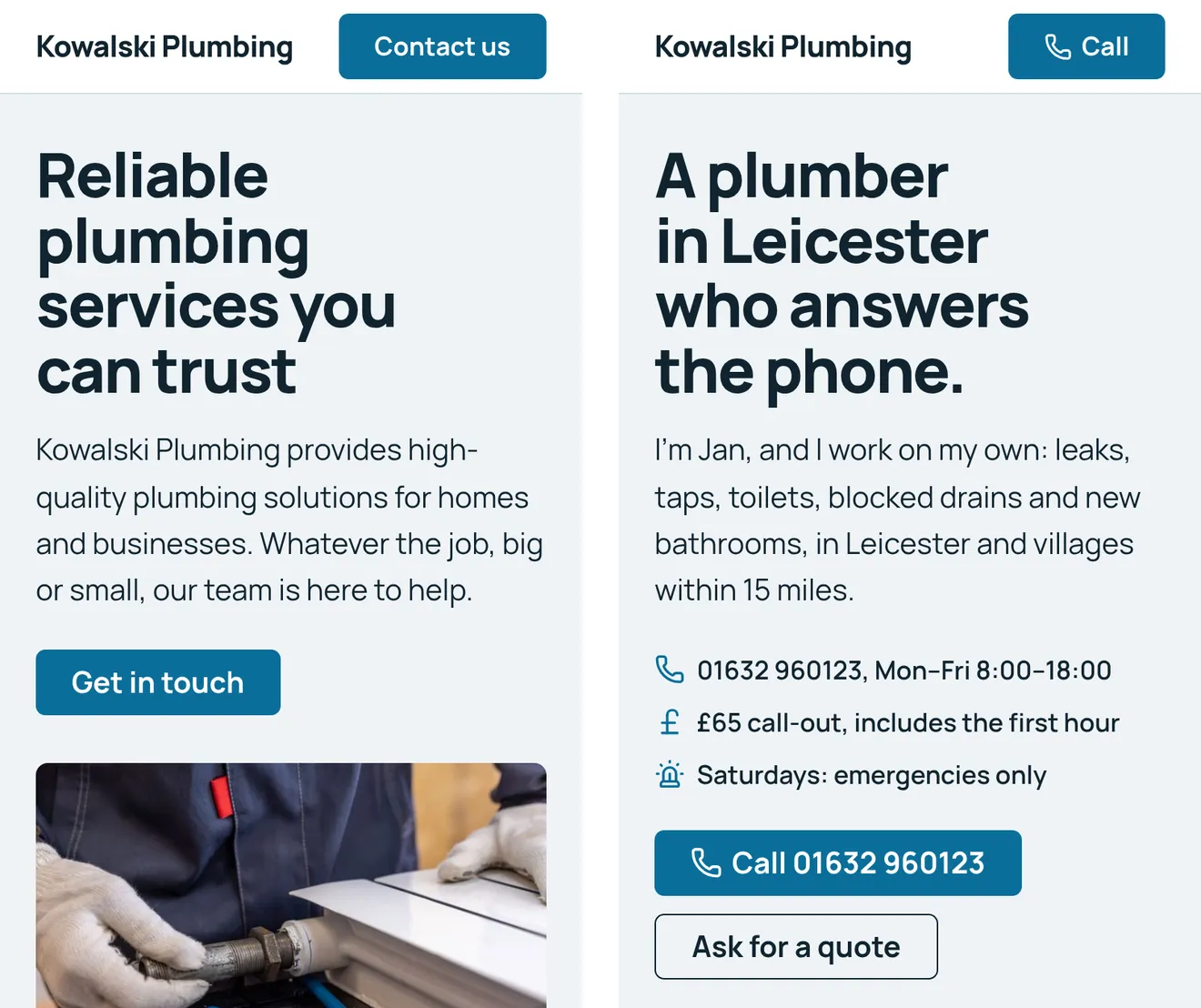
The left page isn't wrong, it's empty: "reliable", "high-quality", "our team", and no area, price, phone or hours. A visitor from Google can't tell whether this plumber comes to their town. The right page answers that in the first screen. Both demos are live: one line and full prompt. (Kowalski Plumbing is made up, and 01632 960123 is a UK number reserved for fiction.)
The 7 details that change the result
- What you are, and where. "A one-man plumber in Leicester" beats "plumbing services". The town also helps on Google.
- Who your customers are. Landlords, parents, tourists, other businesses: it changes what the first screen says.
- Services or products with prices. Even "from £65". A price answers the question every visitor has.
- Opening hours, or "by appointment".
- The one action. Call, book, order or come in. One main button is clearer than four.
- Your own photos. Your work, your place, your food. Stock photos are stand-ins; say you'll add yours.
- The tone. "Plain and friendly", "calm and expert", "written as I". One line is enough.
What not to write
- Design adjectives without facts. "Modern, sleek, premium" changes the colours, not whether a customer calls you. If you have brand colours or a logo, say so; otherwise let the AI choose and change it after.
- Briefs meant for a developer. "Admin panel", "database", "React", "user accounts". For a small-business website you need a booking calendar, a shop or a form, and a good builder adds those as parts you manage yourself.
- Facts you're not sure of. If you write "open every day" and you aren't, it goes on the website.
- Long pasted text from another AI. Write the facts yourself first; paste extra material after, if at all.
Prompts by kind of business
- Salon or barber: "Studio Mira, a two-chair hair and brow studio on Gloucester Road, Bristol. Cut and finish 45 min £42, root colour 90 min £68, brows with Jo. Tuesday to Saturday, late on Thursday. Clients should book online."
- Café or bakery: "Sourdough bakery in Leeds, open Wednesday to Sunday 8–15. Loaves from £4.50, cinnamon buns, cakes to order with 3 days' notice. People should see the menu and order cakes."
- Trade: "Landscaper in Bath: lawns, patios, planting. Quote after a free visit. Main action: a quote request with photos of the garden." Our landscaping example shows what this gives.
- Shop or maker: "Hand-poured soy candles from Vilnius, 6 scents, 2 sizes, €14 and €22, delivery in the EU." List the real products: a shop with nothing in it was the biggest problem in our data.
- Tutor or coach: "Maths tutor for GCSE and A level in Manchester, online or at home, £35 an hour, a free 15-minute call first."
Changing it after: one change per message
The first version is a draft. Read it on your phone, then ask for one change at a time: "Make the phone number bigger in the first screen", "Move prices above the photos", "Add my Saturday hours". Small messages are cheaper and easier to check. On Ginta a small change with the Fast AI costs about 0.3 credits.
With ChatGPT or Claude alone, or with a builder
ChatGPT and Claude write a good page from this prompt on their own. What they can't do alone is keep it online at an address, receive form messages, take bookings or payments, or let you change prices without code. That's what a website builder adds. With Ginta you can use either:
- Ginta's own builder: paste the prompt on ginta.app. A new website on the Free plan is one page (if you name pages, they become sections of it). Ginta builds first and then shows one list of what it guessed and what's still missing, so you can check it; it asks before building only when a message is too thin to build from, or when you write "ask me first". With the Best AI, if you give the business's name and town, it may look up your own website or listing for details like hours and address, and it lists what it took so you can check. A one-page website with Best is about 22 credits, and every account gets 25 when it confirms its email.
- Your own Claude or ChatGPT, connected to Ginta: the same prompt in your assistant, which builds and publishes through Ginta. See Claude or ChatGPT.
The steps on Ginta, timed: a small business website in 10 minutes.
Questions
What is the best prompt to build a website with ChatGPT?
A short, factual one: what you are and where, who your customers are, services with prices, opening hours, the one action visitors should take with your real phone or email, and the tone. Then ask it not to invent anything.
Should I describe the design, colours and fonts?
Only if you have brand colours, a logo or a strong preference. In our data, real facts and real photos changed the score far more than design words.
How long should the prompt be?
Around 50 to 150 words is plenty. Long briefs written for developers didn't help in the websites we looked at.
Do I need to list the pages?
For most small businesses, one well-made page is enough. Name separate pages only when each has real content of its own, such as a full menu or a page per service.
What if I don't have photos yet?
Say "I'll add my own photos". The AI uses stock photos as stand-ins; replace them with photos of your real work as soon as you can, because that's what scored best.
Why does the AI invent things, and how do I stop it?
It fills gaps with likely-sounding details. Give it the facts, add "Don't invent anything I haven't written, and tell me what you assumed", and check every phone number, price and opening hour before you share the link.
Written with AI help for Ginta, which Povilas runs; he also teaches a website-building course. The screenshots are from the real Ginta on the date above, and prices come from our pricing page.