Why your HTML contact form doesn't send email, and 4 ways to make it work
A contact form in plain HTML can't send email on its own: the browser needs an address on a server that receives the message and emails it to you, and a page on a static host has no such address. Point the form at a form service (Formspree, Web3Forms), use forms built into your host (Netlify Forms, Ginta), or write a small server function. For most small websites the first two take five minutes; the third is for people who already write code.
This happens a lot with websites made by ChatGPT or Claude: the page looks finished, the Send button is there, and the message goes nowhere. Below is why, the four ways to fix it, and what each means for spam and privacy. Facts about other services come from their own pages, checked on 20 November 2026. We make Ginta, which is one of the four ways.
Why the form does nothing
Look at the <form> tag in your page. It's almost always one of these:
- No
actionat all:<form>or<form class="contact">. The browser sends the fields back to the same page, usually as?name=…&email=…in the address bar, and nothing receives them. action="send.php"oraction="/contact"on a static host: the page points at a script, but GitHub Pages, Netlify and most "upload your files" hosts don't run PHP. The visitor gets an error page, or the host refuses the POST.action="mailto:you@example.com": the browser tries to open the visitor's email app with a half-written email. Visitors who don't use a desktop email app see nothing happen.- A script that "sends" the form with
fetch()to an address that was never set up: the AI wrote the front half and left the back half for later.
Whichever it is, the fix is the same: the form needs an action that points at something that receives a POST and
does something with it.
Way 1: a form service
A form service gives you an address to put in action. It receives the message, filters spam and emails it to you.
<form action="https://formspree.io/f/your-form-id" method="POST">
  <label>Email <input type="email" name="email" required></label>
  <label>Message <textarea name="message" required></textarea></label>
  <button type="submit">Send</button>
</form>
- Formspree (plans): the free plan is limited to 50 submissions a month, and its dashboard shows the last 30 days; the cheapest paid plan, Personal, is $15 a month ($10 a month paid yearly).
- Web3Forms works the same way with an access key in a hidden field; check its pricing for the current free limit.
Good: works on any host, five minutes. Less good: your visitors' messages are stored at a third company, so your privacy page must say so; free plans have monthly caps; one more account to keep.
Way 2: forms built into your host
Some hosts receive forms themselves, so there's no third company.
- Netlify Forms (docs): you switch on form detection in Netlify
and add
data-netlify="true"(ornetlify) to the<form>tag. Netlify's docs say forms are free and unlimited on its credit-based plans; older plans meter them. - Ginta: every website has a form inbox, explained below.
Good: no extra account, messages next to the website. Less good: you're tied to that host's way of doing it.
Way 3: your own server function
If you already write code, a small function receives the POST and sends the email through an email API, or appends a row to a spreadsheet. A Cloudflare Worker, a Vercel or Netlify function, or a Google Apps Script web app all work. Our post on sending form entries to Google Sheets has a Google Apps Script example.
Good: full control, often free. Less good: you now maintain code, an email-sending account and your own spam protection.
Way 4: mailto, and why it's the worst
action="mailto:…" needs no server, which is why it's tempting. But it depends on the visitor having an email app set
up on that device, shows them your address and a raw email, and you can't tell how many people gave up. Use a plain
mailto: link next to a real form instead, for the people who prefer email.
Spam without a CAPTCHA
Most contact-form spam comes from bots that fill in every field. Two things stop most of it without annoying anyone:
- A honeypot: a hidden field that people never see and bots fill in. If it has a value, the message is dropped.
- A rate limit: a few messages a minute from one visitor, at most.
Form services and Ginta do both for you. Add a CAPTCHA only if spam still gets through.
Privacy: where the messages live
A contact form collects personal data: at least a name and an email address. Under the GDPR (Regulation (EU) 2016/679) you tell people what you collect and why, usually on a privacy page linked under the form or in the footer. Say who receives the messages (you, your host, a form service) and how long you keep them. Ask only for what you need to reply.
How it works on Ginta
On a Ginta website the form needs no setup. The form block is ordinary HTML:
<form method="POST" action="/f/__SITE_ID__">
  <input type="text" name="_gotcha" hidden>
  <input name="email" type="email" required> <textarea name="message"></textarea> <button>Send</button>
</form>
Ginta fills in the website's own inbox address when it publishes the page. What happens to a message:
- It's kept in Messages in Ginta, and emailed to you once your email address is confirmed. Each plan has a daily cap on form emails per website (limits); above it, messages still wait in Messages, nothing is lost.
- Spam: the
_gotchahoneypot, posts accepted only from that website's own pages, and 5 messages a minute per visitor per website. Up to 20 fields and 5 KB per message. Visitors' IP addresses are stored only as a keyed hash. - Another app: every new message can also go to Zapier or Make, from the website's Settings → Messages, and from there to Google Sheets, Slack or a CRM (Zapier and Make).
- Privacy: Ginta's builder adds a privacy page that says the website collects form messages.
A form with no address still arrives. Since 15 November 2026, when a Ginta page has a <form> with no action
that asks for personal details (a message box, an email or phone field), Ginta sends it to the website's inbox. We
built a demo bike workshop for this post with exactly that: a quote form whose tag is just <form class="hb-form">.
Ginta's publish check still pointed out that the form had no address, and on the live page the form posts to the
inbox. The test message below arrived in Messages a second later.
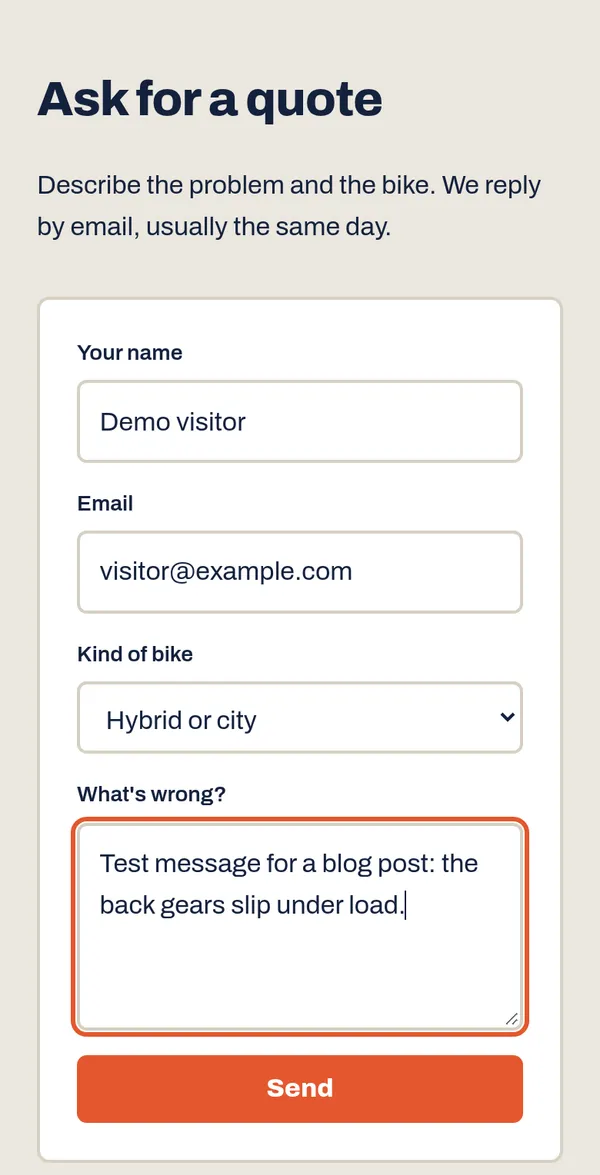
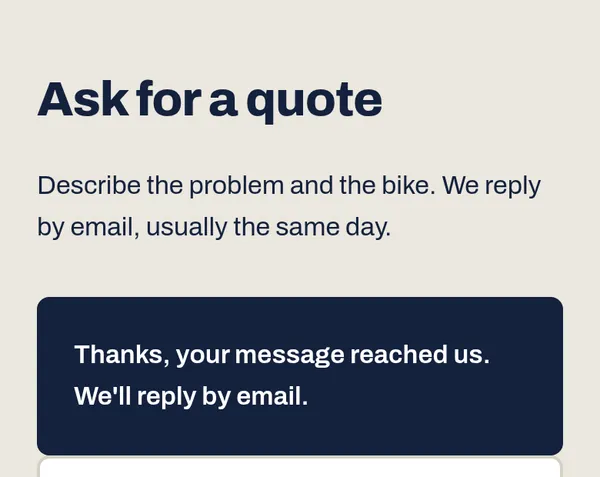
The demo is at harbour-bike-repair.ginta.page. When Ginta's own AI builds a website, it also opens every page like a visitor afterwards and sends each form once with a marked test message, which Ginta deletes straight away.
What Ginta's forms don't do: they work only on websites hosted on Ginta (Ginta isn't a form service for other
hosts), and they don't take file attachments. And because publishing refuses forms that post to another website,
a Formspree action doesn't work on a Ginta page: you don't need it there.
Which to choose
- Your website is on GitHub Pages or another static host and you want to keep it there: a form service (Way 1).
- It's on Netlify: Netlify Forms (Way 2).
- You'd rather not deal with any of this: host the website where forms are built in. On Ginta that's free, at a
name.ginta.pageaddress; your own domain starts at €5 a month if you build with your own Claude or ChatGPT. See pricing and how to publish a website you made with AI.
Questions
Can an HTML form send an email without PHP?
Not by itself. Something on a server has to receive the form and send the email: a form service, your host's built-in forms, or a small function of your own. None of them need PHP.
Why does my contact form open my email app?
Its action starts with mailto:. That hands the message to the visitor's email app instead of sending it. Point
the action at a form service or your host's form address.
Is Formspree free?
Formspree has a free plan limited to 50 submissions a month; its dashboard shows the last 30 days. Paid plans start at $15 a month, according to its plans page.
How do I stop spam without a CAPTCHA?
Add a honeypot field that's hidden from people, and limit how many messages one visitor can send a minute. Most form services and hosts with built-in forms do both.
Does a contact form need a privacy notice under the GDPR?
If it collects personal data, such as a name and email address, yes: tell people what you collect, why and who gets it, usually on a privacy page linked from the form or the footer.
My AI-made website's form doesn't work: what do I tell ChatGPT or Claude?
Tell it where the website is hosted and ask it to point the form at that host's form address, or at a form service
you've signed up for. If the website is on Ginta, ask it to use Ginta's form block from the guide (get_guide), or
leave the form as it is: on Ginta a form with no address that asks for contact details is sent to your inbox.
Written with AI help for Ginta, which Povilas runs; he also teaches a website-building course. The screenshots are from the real Ginta on the date above, and prices come from our pricing page.