What parents and students check before they choose a tutor
The person reading your website is often a parent with a deadline in mind: a test next month, a grade that slipped, an exam next year. Before they get in touch they look for:
- The exact subject and level. "Math" is too broad. Say the grades, the courses or exam boards you know (GCSE and A level, IB, AP, a province's course codes), and whether you help with homework, exam preparation or both.
- Online, in person, or both, and where in-person lessons happen: at the student's home, at your place, or a library.
- How a session works. What happens in the first lesson, what the student brings, how you check progress.
- Who you are. Your own studies or teaching experience, and why you explain things well. A student tutor is a real selling point for many families: you sat the same courses recently.
- Checks and safety when you work with children. In England and Wales anyone 16 or over can request a basic DBS check; in Canada many tutors get a vulnerable sector check from their local police. Say what you have, and keep the certificate to show on request.
- Price and availability: per hour, blocks of lessons, a free first chat if you offer one, and the days and times you usually have free.
The sections a tutor website needs
- Top of the page: the subject, the level, online or where, and one button: Request a session or Book a free first chat.
- What we work on: the courses or topics, in the words parents and students use.
- How a session works: three or four honest steps. This is where you show how you teach.
- Online or in person: what each needs (a laptop and a quiet room; a table and paper) and the area you cover.
- About you: your studies or experience, and what you're like as a teacher.
- Prices and availability, with your cancellation rule if you have one.
- A request form that asks for the grade, the course and what the student is stuck on.
Mistakes we see on tutor websites
- Every subject from 5 to 18. A long list reads as "not really an expert in any". Lead with what you're best at.
- No price. Parents compare. A starting price per hour is enough.
- A home address on the page. If students come to you, give the area on the website and the address after booking. If you meet at a library, say so: parents find it reassuring.
- Promises nobody can keep. "Guaranteed A" and invented success rates put careful parents off. Describe how you work, and add real feedback from families only with their permission.
- Collecting too much about a child. The request form needs a name, a contact, the grade and what they need help with. School reports, diagnoses and other sensitive details can wait for a conversation. This is general information, not legal advice.
Getting found locally
Search for tutoring is local even when the lessons are online: parents type "math tutor [city]" or "GCSE chemistry tutor near me". Use the city or area and the course names on your page, the way they type them.
Google Business Profile has limits for tutors. Online-only businesses aren't eligible, and neither is "an ongoing service, class, or meeting at a location that you don't own or have the authority to represent", such as a library table (eligibility). If you travel to students' homes, you can set up as a service-area business, hide your address and list the areas you cover (service areas). If you're online only, your website and the places you're listed (school noticeboards, tutoring directories, local parent groups) do that job instead.
How it works with Ginta
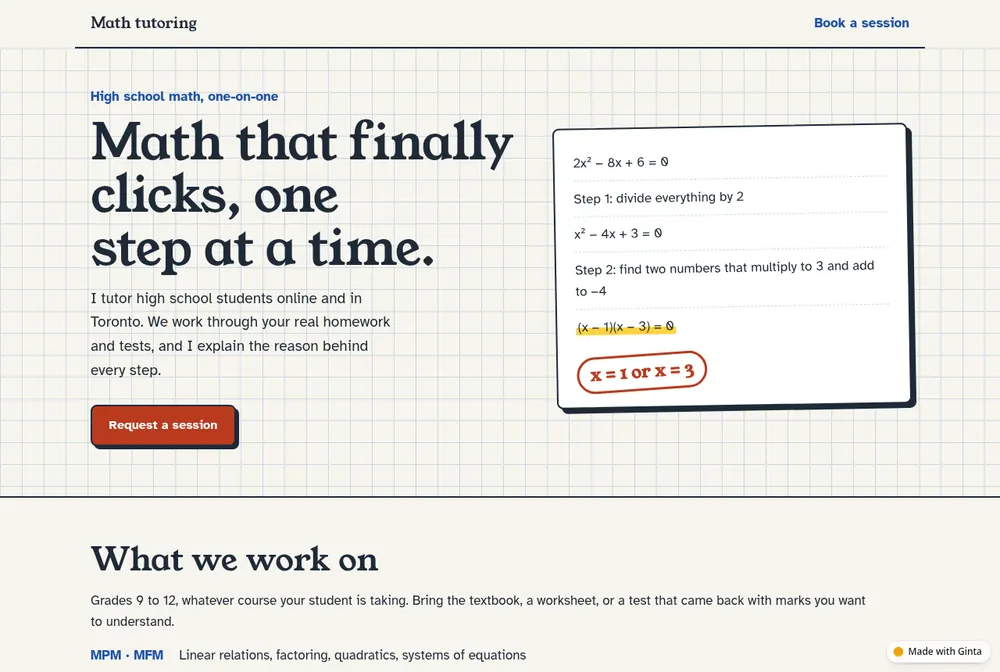
Our example came from one line: "math tutor for high school kids, online and in toronto, im a student at UofT". The page opens with a quadratic equation solved step by step, because that's what the tutor sells. It lists the Ontario courses by code, explains a session in four steps, describes online and in-person lessons (at a library or study spot, with no home address on the page), and ends with a request form for the grade, the format and the course. It invented no prices and no results.
Describe what you teach in a sentence and the site is live a minute or so later. Messages from the form land in your Ginta inbox and your email. Then add what you need by asking: on a paid plan, Bookings lets families pick a free time for a one-hour lesson and get a calendar entry; Events & classes handles a group revision session with a set number of places. A Blog works for study tips and exam-season notes. Your own domain is on paid plans (from €5 a month).
Questions
What should a tutor website include?
The subjects and levels you teach, online or where, how a session works, a few lines about you, your price, and a short request form. One page does it.
Should I put my prices on my tutoring website?
Yes, at least a starting price per hour. Parents compare tutors, and many won't send a message without a rough idea of the cost.
I'm a university student. Can I tutor and have a website?
Yes, and say so: families often like a tutor who took the same courses a few years ago. Keep it honest about what you teach, and add real feedback once you have it.
Can parents book lessons on my website?
With Ginta's Bookings, parents pick a lesson type and a free time, and both of you get a confirmation with a calendar entry; they can change or cancel with their own link. On any plan you can start with a request form and confirm times by email.
Can an online tutor get on Google Maps?
Not if you only teach online: Google Business Profile doesn't accept online-only businesses. Tutors who travel to students can list as a service-area business with their address hidden.