Can you move a Wix website to another host? What you can take, and how to switch without losing Google
No: Wix doesn't let you export a website to another host, because Wix websites only run on Wix's own servers. What you can take is your domain (point it elsewhere or transfer it), your text and photos, your store's products as a CSV file, and your Google rankings, if you rebuild the website and send each old address to its new page with a 301 redirect before you cancel. For a small business with a handful of pages, that's an afternoon's work.
Everything about Wix below comes from Wix's own help centre, checked on 20 November 2026, linked so you can read the current wording. We make Ginta, one of the places you can move to; the steps work for any host.
What Wix lets you take, and what it doesn't
- The website itself: no. Wix's article Exporting or Embedding Your Wix Site Elsewhere says a Wix site needs to be hosted and operated on Wix's servers, and adds that the content you build on Wix belongs to you. So you rebuild; you don't export.
- Blog posts: no export. Wix says "it is not possible to export blog posts to other platforms"; it's a feature request collecting votes. Copy the posts you want to keep by hand.
- Store products: yes, as a CSV file. Up to 5,000 rows per file, and digital products can't be exported (Wix Stores: Exporting Your Product List).
- Your domain: yes. A domain bought from Wix can point to a site hosted elsewhere (Connecting a Wix Domain to an External Site), or be transferred to another company (Transferring Your Wix Domain Away from Wix).
Step 1: list your pages and their addresses
Open your Wix site and write down every page's address: /about-us, /services, /contact, and the odd ones Wix
made for you, like /blank-1 or /book-online. Google has learned these addresses; links from other websites,
Facebook posts and Google Maps point at them. If you use Google Search Console, its Pages and Performance reports show
which addresses Google knows and which ones bring visitors.
Step 2: rebuild the website
Three ways, from least to most effort:
- Describe the business to an AI website builder and paste in the text you want to keep. On Ginta, if you name the business and its town, the Best AI may look up your current website or listing for details like services, hours and address, and it lists what it took so you can check. It doesn't copy text or photos from websites, so paste your own words and add your own photos.
- Use your own Claude or ChatGPT, connected to Ginta: give it your old text and the list of pages, and it builds and publishes them (Claude, ChatGPT).
- Copy page by page into any builder.
Download your own photos from your Wix media first: they're the most valuable thing on the old website. Products: in the new shop, import Wix's CSV file. On Ginta that's Shop → More → Import from CSV: it matches the columns, shows a preview first, and copies the product photos into Ginta in the background (Import products from a CSV). Wix's help doesn't list the file's columns, so check the preview, especially sizes and colours.
While you work, keep the new website private so nobody lands on half a site: on Ginta, Settings → General → Who can see it → Private puts a password page in front of it, on every plan (how it works).
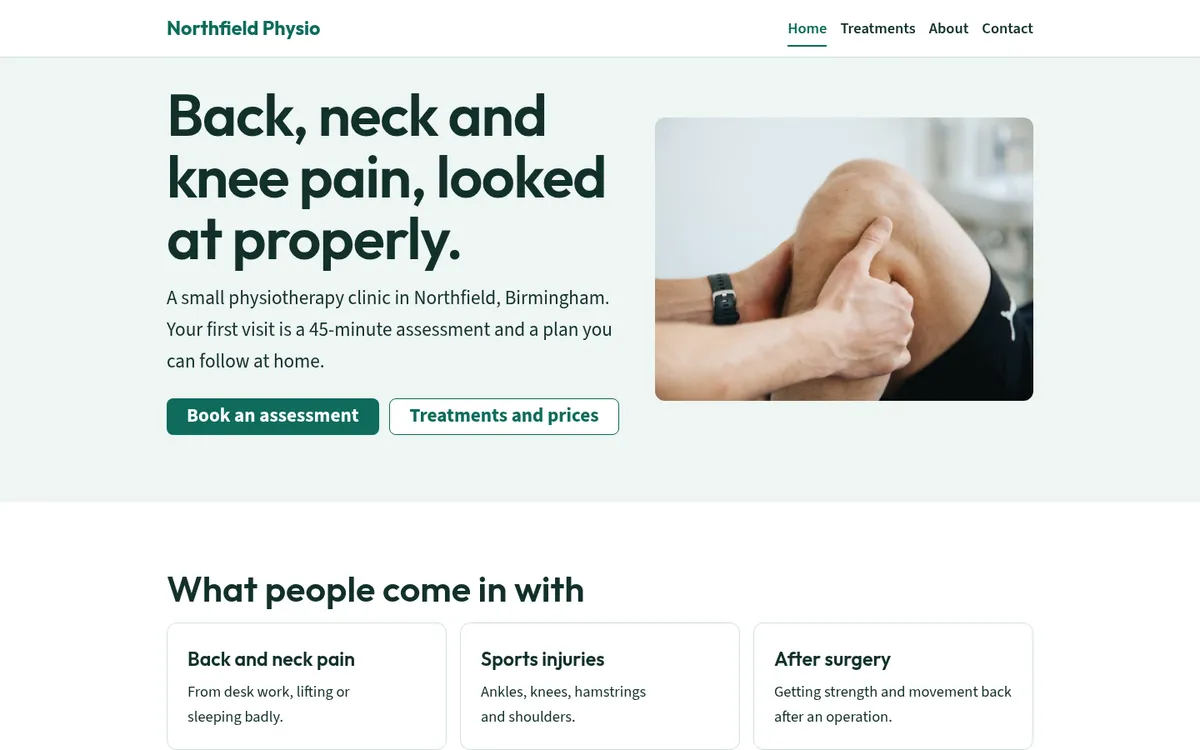
We rebuilt a made-up four-page physio clinic this way for this post: northfield-physio.ginta.page.
Step 3: send each old address to its new page
A 301 redirect tells browsers and Google that a page has moved for good. Google's site move guide recommends server-side permanent redirects from the old addresses to the new ones, and says to keep them "for as long as possible, generally at least 1 year".
Two ways on Ginta:
- Keep the same addresses. Give a new page the address it had on Wix: in the website's Settings → Google &
sharing, open the page and change its Page address to
about-us. Links on your website follow, and Ginta sends the page's previous address there by itself. This works for every page except the home page. - A
_redirectsfile, one line per old address, in the same format Netlify and Cloudflare Pages use. This is the demo's:
# Old Wix addresses -> the new pages (301 = moved for good)
/about-us      /about        301
/services      /treatments   301
/contact-us    /contact      301
/blank-1       /contact      301
/book-online   /contact      301
Ask your Claude or ChatGPT, connected to Ginta, to add it, or upload it with your files. Once the file exists, you
can see and change it in the editor's Code tab. A line can also cover many addresses at once (/post/:slug or
/old/*), up to 200 rules (files and redirects). On the demo, opening /about-us answers with a 301
to /about, and /blank-1 with a 301 to /contact. Try it: northfield-physio.ginta.page/about-us.
Step 4: move the domain
You have two choices for a domain bought from Wix:
- Point it (simplest): the domain stays registered at Wix, and you change its DNS records in Wix to the ones your
new host gives you, usually an A record for the bare domain and a CNAME for
www. Wix's pointing article says to delete the old A and CNAME records after adding the new ones. DNS changes can take a few hours to reach everyone. - Transfer it to another company. Wix's article says the domain must be unlocked, can't move within 60 days of purchase or of a change to the owner's contact details, and that you get a transfer code by email. If you have business email on the domain, Wix says you need to add its MX records again after the transfer.
On Ginta your own domain needs a paid plan: from €5 a month if you build with your own Claude or
ChatGPT, or €19 a month on Light (1 domain). In the website's Settings → Address & domain,
"Already have a domain? Connect it" shows the records to add; your bare domain becomes the main address and www
leads to it. Details: connect your own domain.
Step 5: cancel Wix, at the right time
Cancel only after the new website is live on your domain and the redirects work. Wix's help on canceling a Premium plan says:
- cancel within 14 days of buying a plan and it ends at once with a full refund;
- after 14 days the plan stays active until the end of the billing period;
- when it ends, the site goes back to the free Wix address, with Wix ads, and your content stays;
- canceling the site plan doesn't cancel a domain, business email or app subscriptions: cancel those separately, or keep the domain at Wix if you pointed it.
So with a yearly plan, the cheapest moment to switch is usually just before it renews. Turn off auto-renewal early so you don't pay for another year by accident.
Leaving Squarespace instead?
It's similar. Squarespace's export guide makes an .xml file for WordPress with basic pages, text and image blocks and one blog, but not store pages, product blocks, style settings or custom CSS. The same five steps apply.
Questions
Can I export my Wix website?
No. Wix says its sites have to be hosted on Wix's servers. You can export store products as a CSV file and take your text, photos and domain, then rebuild the website elsewhere.
Will I lose my Google ranking if I leave Wix?
Not if you keep or redirect every old address. Give new pages the same addresses, or add a 301 redirect from each old address to its new page, and keep the redirects for at least a year, as Google recommends.
Can I keep my domain if I cancel Wix?
Yes. Point it to your new host and keep it registered at Wix, or transfer it away. Wix says canceling a site plan doesn't cancel the domain; that's a separate subscription.
What happens to my Wix email?
If you point the domain, leave its email (MX) records as they are. If you transfer the domain, Wix says to add the MX records again after the transfer so business email keeps working.
Can I move my Wix store's products?
Yes: export them from Wix as a CSV file and import it into your new shop. Digital products can't be exported from Wix. On Ginta the import shows a preview and copies the photos over.
How long does switching take?
The rebuild takes from minutes (an AI builder plus your own text) to a day for a bigger site. A domain change can take hours to reach everyone, and a transfer days, so plan a week between starting and canceling Wix.
Written with AI help for Ginta, which Povilas runs; he also teaches a website-building course. The screenshots are from the real Ginta on the date above, and prices come from our pricing page.