Ginta Commerce
PDF receipts with VAT for every order, made by your shop
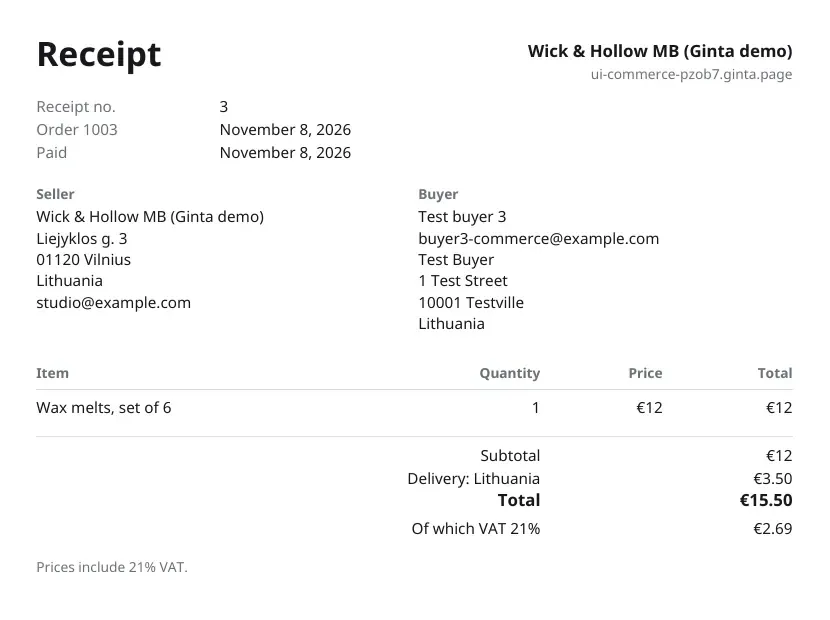
Every paid order in a Ginta shop gets a PDF receipt: your business as the seller, the buyer, each line, delivery, discount, gift card, the total and, if you charge VAT, the part of it that is VAT at your rate. Receipts are numbered 1, 2, 3… per website at the moment of payment, never reused, and written in the language the buyer used. The buyer finds it on their order page; you find it on each order in Ginta. Every plan.
What's on it
- The seller is you, from your shop's Seller information: business name, address, email, and your registration and VAT numbers if you've entered them. Ginta's name isn't on it as the seller.
- The receipt number (its own sequence, counted at payment, so cancelled checkouts leave no gaps), the order number and the date paid.
- The buyer: name, email and delivery address.
- Lines with quantity, price and total; the delivery option and its price; any discount and gift card.
- VAT: with "Prices include VAT" at your rate, the receipt shows "Of which VAT 21 %" and the amount. With "No VAT is charged", it says that instead.
Setting your VAT line
In Shop → Settings choose Prices include VAT (and your rate) or No VAT is charged. The same line then shows under prices on product pages, in the cart and on receipts, so buyers see the same thing everywhere. Only set what's true for your business: Ginta doesn't work out which rate applies to you.
For your bookkeeping
- Orders CSV by dates: Shop → Orders → export, from and to a date, paid orders only, with receipt numbers, buyers, items, delivery, discounts, gift cards, totals and refunds.
- Sales: revenue after refunds, orders and average order for the last 7, 30 or 90 days.
- Stripe: payouts and Stripe's fees are in your Stripe Dashboard's reports.
What it isn't
A Ginta receipt is a sales receipt for a consumer. Ginta doesn't make formal VAT invoices for business buyers (with the buyer's company and VAT number) or credit notes for refunds yet, and it doesn't file VAT returns. If you sell to businesses or need a specific invoice format in your country, check with your accountant.
Questions
Do I need to send receipts myself?
No. The buyer's order page has the receipt. You can open and print it from the order in Ginta too.
Can the receipt show my VAT number?
Yes: enter it in the shop's Seller information.
What languages are receipts in?
The language the buyer used on your website, in any of the nine languages Ginta's shop pages speak.


